Contents
- Blog
- Wireless, Network, Computing
The Challenges of Network Design and Operations for Rack-Scale GPU Server Deployments
#Other #AI #GPUServer
Oct 22, 2026
SoftBank Corp.
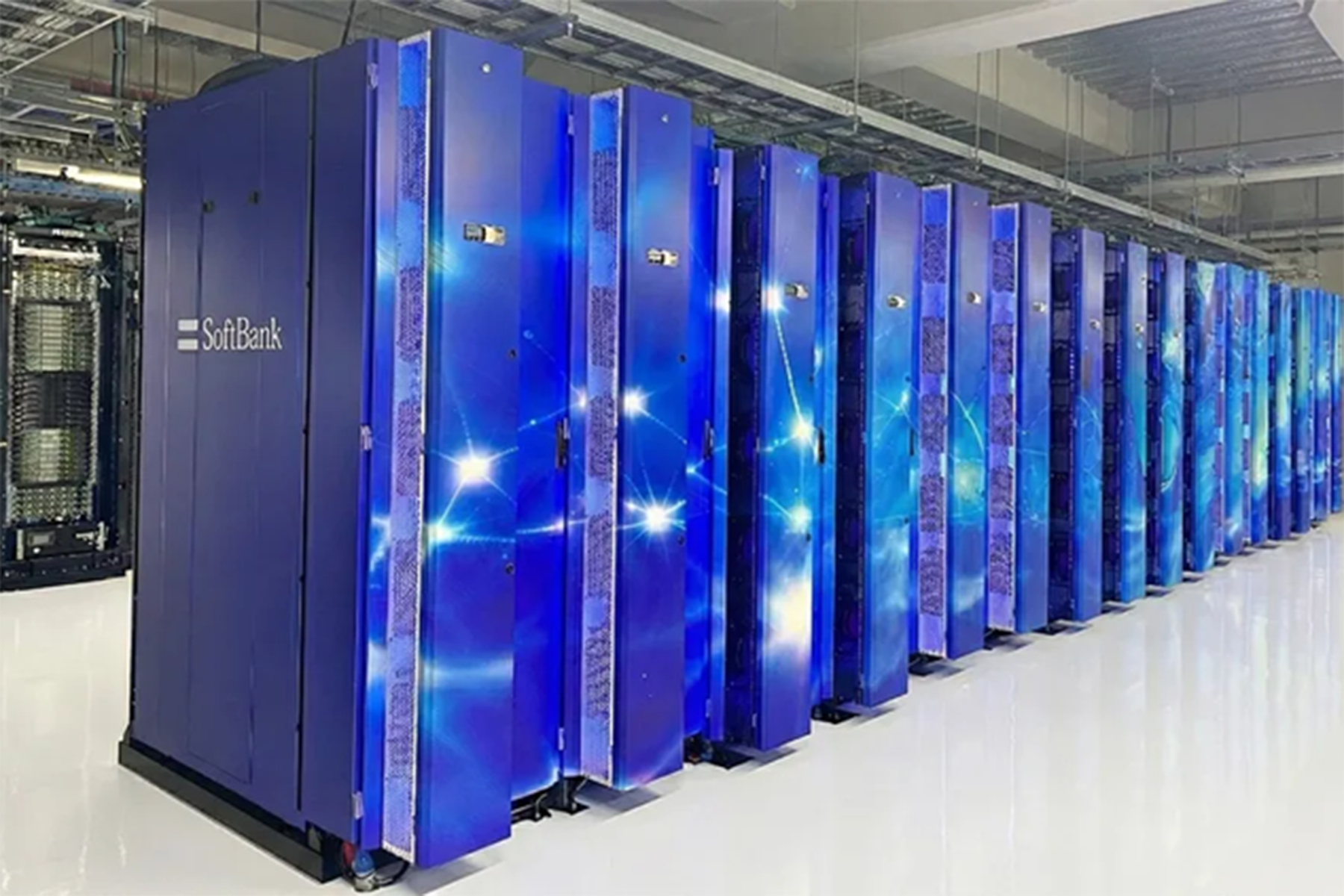
As generative AI rapidly gains adoption, AI computing infrastructure that connects large numbers of GPUs over high-speed networks is becoming increasingly important. SoftBank has operated AI computing infrastructure since 2023 and has continued to build out new infrastructure.
Our latest undertaking is the deployment of rack-scale GPU servers, which treat an entire rack as a single system.
The shift to rack-scale systems has changed more than GPU server performance. It has significantly broadened the scope of what network engineers must consider, encompassing liquid cooling, power, switches, optics, cabling, and even data center facilities.
This article describes the challenges we encountered while building networks for rack-scale GPU servers and how we resolved them. Beyond network design, we share practical lessons from the deployment, including cabling for tens of thousands of interfaces, physical-layer troubleshooting of network equipment, and the operation of liquid-cooling systems.
Note: This article summarizes lessons learned from designing, deploying, and operating networks for rack-scale GPU servers, based on the presentation and slides titled “Challenges in Network Design and Operations for Rack-Scale GPU Servers” at JANOG58 MEETING in Matsuyama.
1. Design Principles for AI Computing Infrastructure
What Has Changed with Rack-Scale GPU Servers?
With conventional GPU servers, power, cooling, networking, and operations were designed around individual servers. We had also accumulated deployment and operational experience with air-cooled GPU servers, allowing us to establish a set of design patterns.
Rack-scale GPU servers, however, require a fundamentally different design approach.
Because components such as compute trays and NVLink switch trays are tightly coupled through high-speed interconnects, the entire rack must be designed as a single system rather than as a collection of individual servers.
This deployment also required support for liquid cooling, the construction of Ethernet-based networks, and additional coordination with facility teams.
As a result, understanding the architecture of the entire rack—including power and cooling—became a prerequisite for network design, rather than focusing on the network alone.
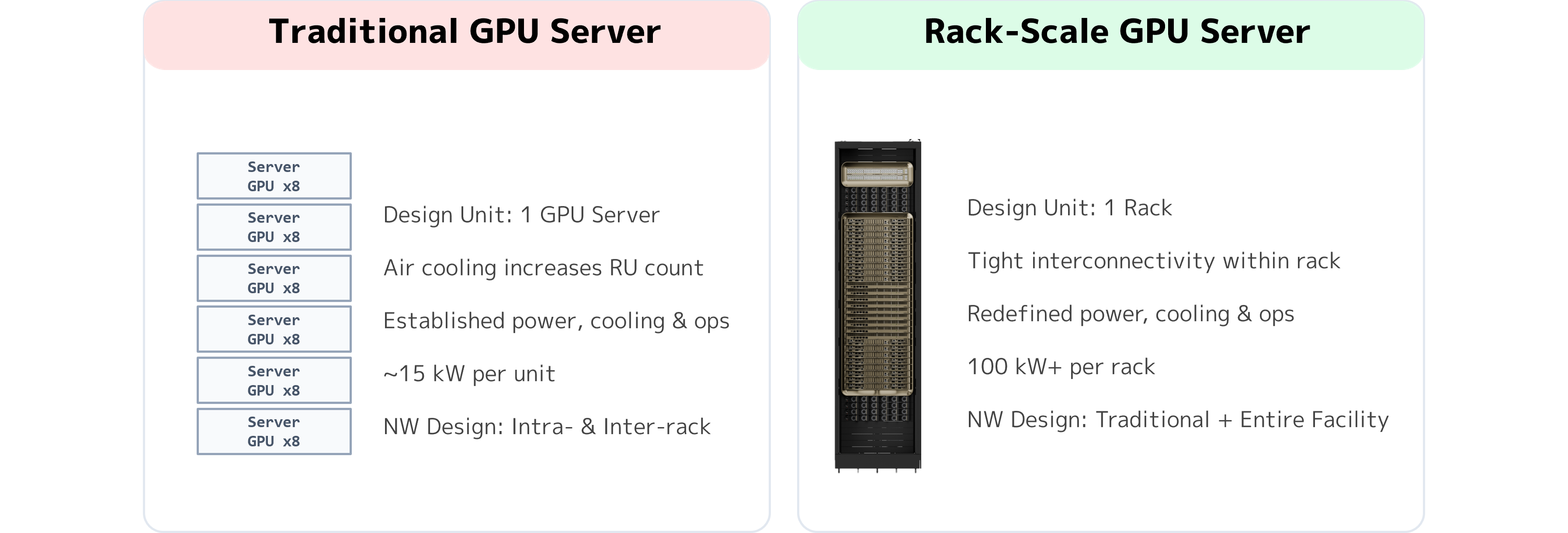
Understanding the Internal Rack Architecture
To design a network for rack-scale GPU servers, we first need to understand the role of each component within the rack.
OCP ORv3 and Rack-Level Power Design
The racks used in this deployment follow the Open Compute Project (OCP) ORv3 specification.
Unlike conventional 19-inch EIA racks, ORv3 uses a 21-inch width. A busbar at the rear of the rack supplies power to each device.
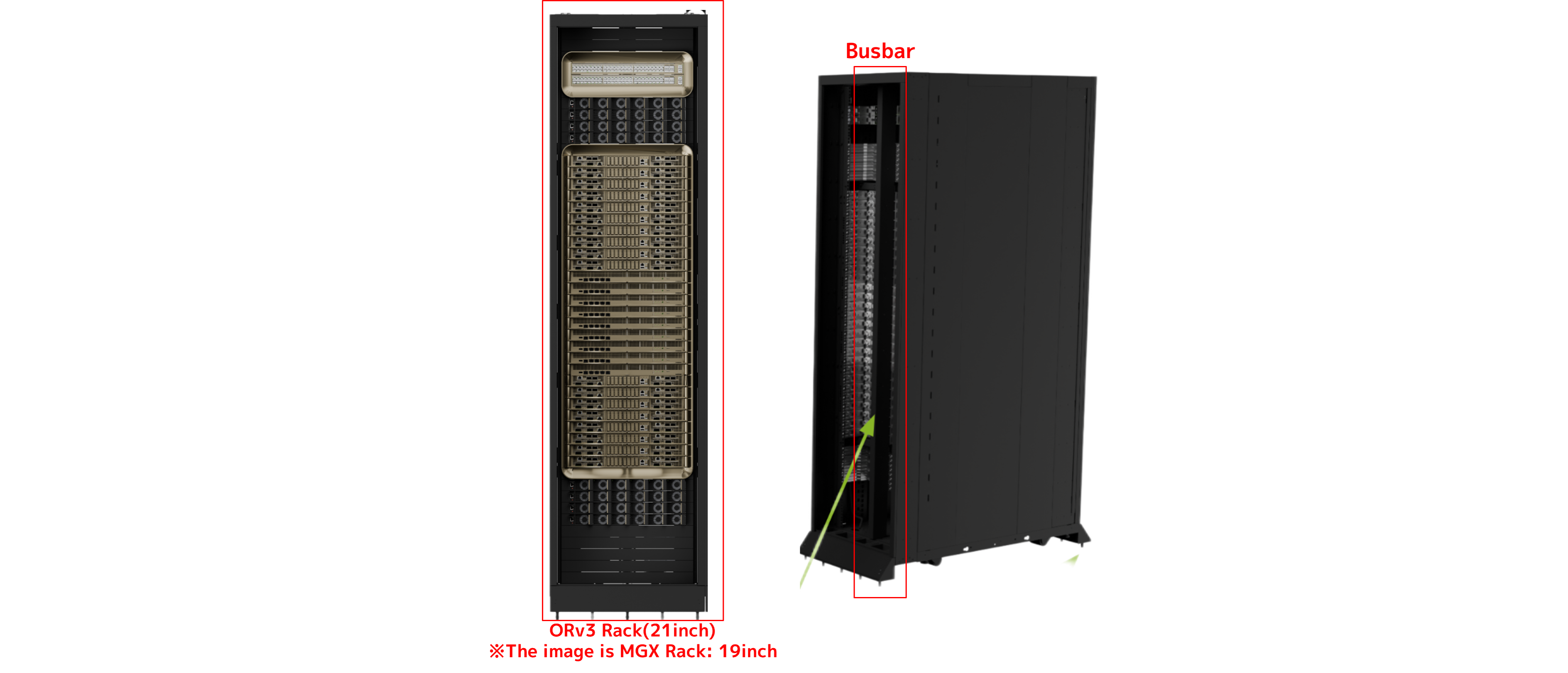
NVIDIA DGX GB Rack Scale Systems – Busbar
Conventional network equipment typically has a power supply unit (PSU) in each device to convert power. In rack-scale GPU servers, by contrast, power conversion is centralized in power shelves, and power is distributed to devices within the rack through the busbar.
Compute Trays and High-Speed NVLink Connectivity
Each rack contains multiple compute trays, each running its own operating system.
NVLink switches provide high-speed communication between compute trays. The trays connect through the NVLink switches, with cable cartridges known as the NVLink Spine providing high-speed connections at the rear of the rack.
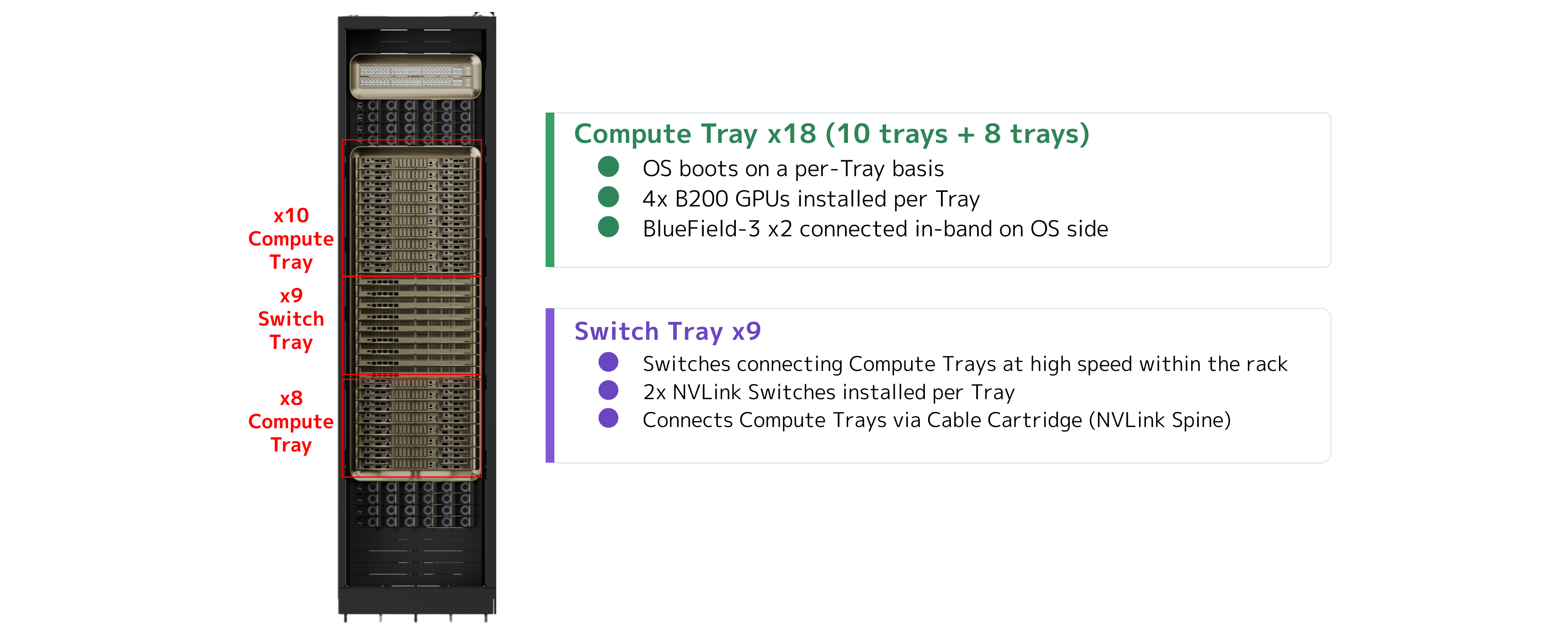
NVIDIA DGX GB Rack Scale Systems – Compute Tray and NVLink Switch Tray
During deployment, understanding the physical layout is just as important as understanding the logical architecture.
For example, even whether trays are numbered from the top or the bottom of the rack affects cabling and equipment replacement procedures.
In a large-scale environment, small misunderstandings like this can lead to errors across many installations. It is therefore important to confirm the physical configuration before equipment is delivered.
CDUs and Manifolds for Liquid Cooling
Liquid-cooling equipment is another essential component of rack-scale GPU servers.
A coolant distribution unit (CDU) circulates coolant through the rack. In addition to circulating the coolant, it monitors parameters such as temperature, flow rate, and pressure. Manifolds at the rear of the rack distribute the coolant to individual devices.
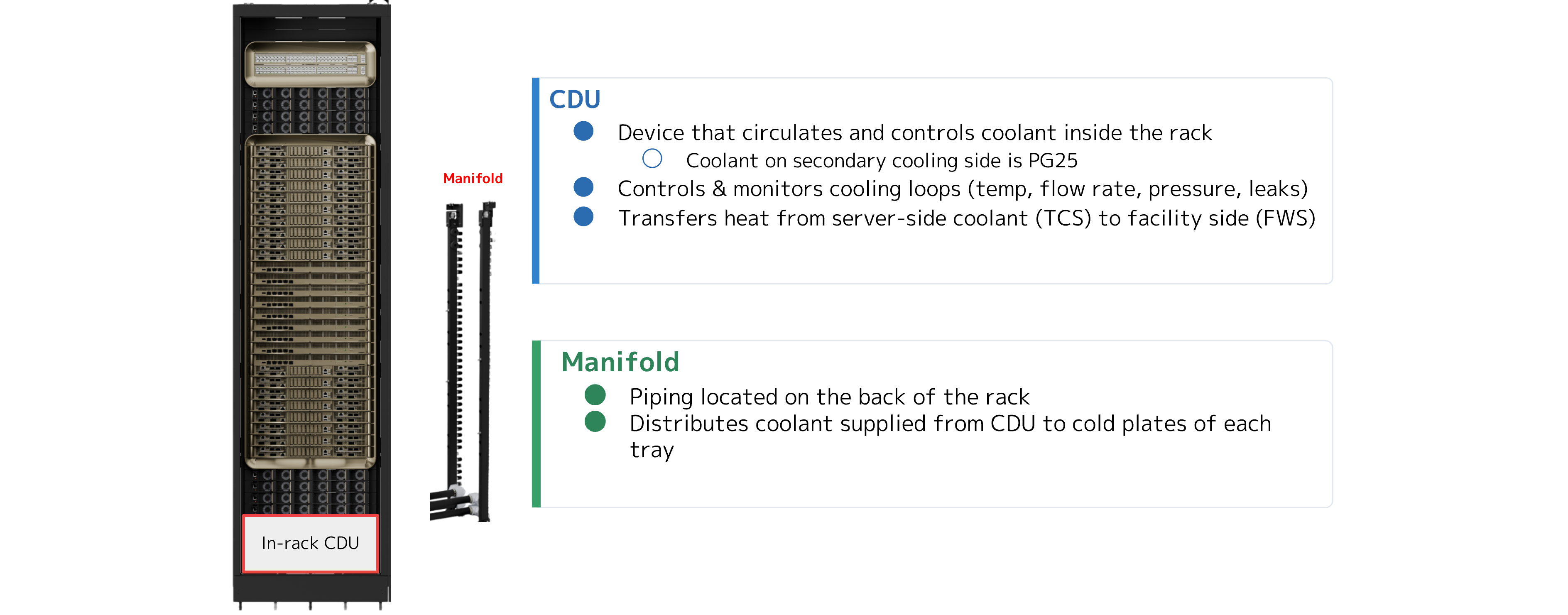
NVIDIA DGX GB Rack Scale Systems – CDU & Manifold
Condensation requires particular attention. Coolant temperature cannot be considered in isolation: condensation can occur depending on its relationship with the humidity inside the data center. We therefore need to coordinate alarm thresholds with the data center operator, considering conditions such as the temperature at which condensation would occur at the current humidity level.
Network engineers who work with liquid-cooled equipment will also need to understand the architecture and standards of these cooling systems. The location of the CDU significantly affects cable routing and cable management within the rack. Keeping up with standards for future liquid-cooled switches and reviewing operations and maintenance arrangements will also be essential.
Designing Three Types of Network Fabric
Once the internal rack architecture is understood, the next step is to design the network fabrics that connect the racks.
Our environment uses three main types of fabric:
・Compute Fabric
・Converged Fabric
・OOB Fabric
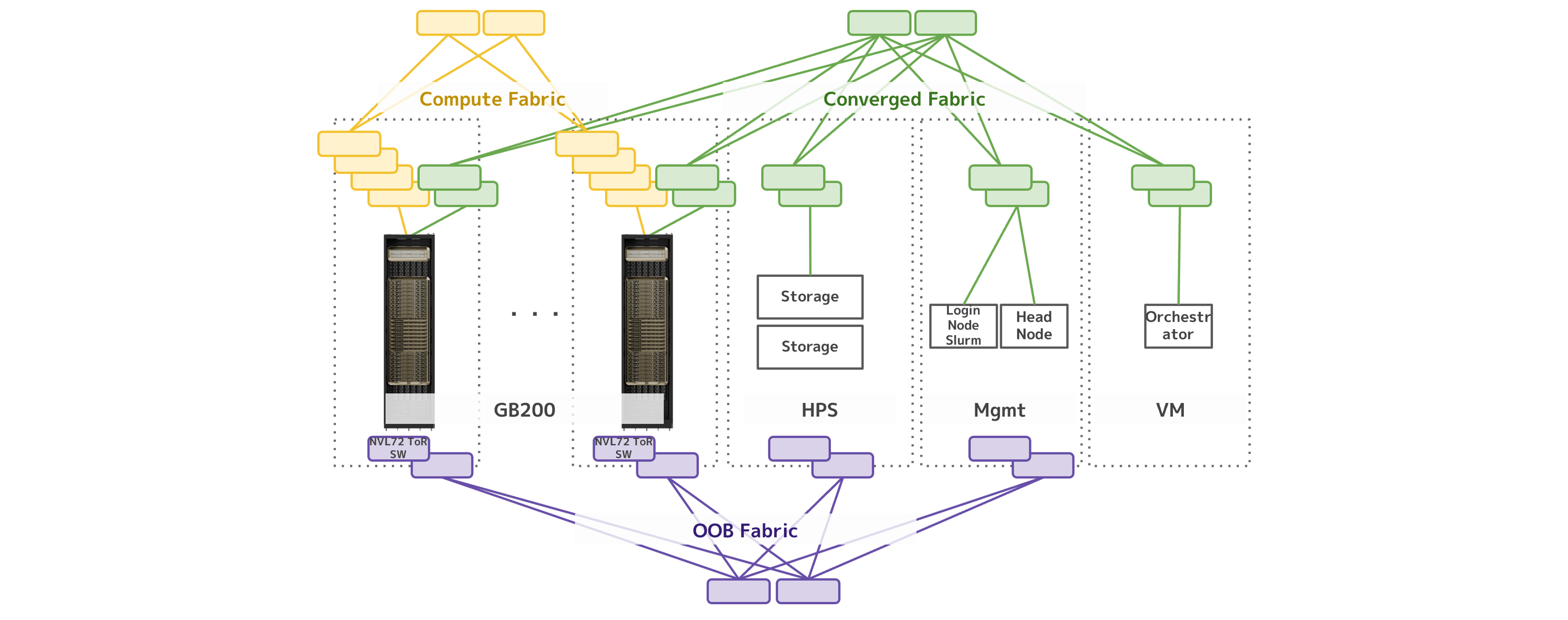
Overview of the SoftBank NVL72 GB200 Network
Compute Fabric: High-Speed Communication Between GPUs
The Compute Fabric provides high-speed communication between GPUs.
It connects the GPU-side NICs to leaf switches and is designed with fault tolerance and other operational requirements in mind.
SoftBank uses technologies such as Adaptive Routing, BGP, and ECMP to balance traffic across the Compute Fabric.
Because large numbers of GPUs communicate simultaneously in large-scale AI computing infrastructure, building a high-bandwidth network alone is not enough. How traffic is distributed is equally important.
Converged Fabric: Combining Front-End and Storage Traffic
The Converged Fabric combines the front-end network used for internet access and similar functions with the network that provides access to high-speed storage.
Traffic serving different purposes is consolidated onto a single physical network while remaining logically separated.
For storage traffic in particular, we design around the bandwidth required per GPU so that the network does not become a bottleneck for the read and write performance the GPUs require.
OOOB Fabric: Managing Devices and Facility Equipment
In the rack-scale era, the OOB Fabric is more than a server management network: it is a key element of rack design. In NVL72 systems, top-of-rack (ToR) management switches are used to monitor not only compute trays and NVLink switches, but also power and cooling equipment such as CDUs, power shelves, and rear door heat exchangers (RDHx). It is important to view the entire GPU rack as a single system and manage compute, networking, power, and cooling together.
Choosing the Granularity of GPU Resource Provisioning
After the network is built, we need to decide the granularity at which GPU resources will be provided to users. The three main options are rack-level, tray-level, and GPU-level provisioning.
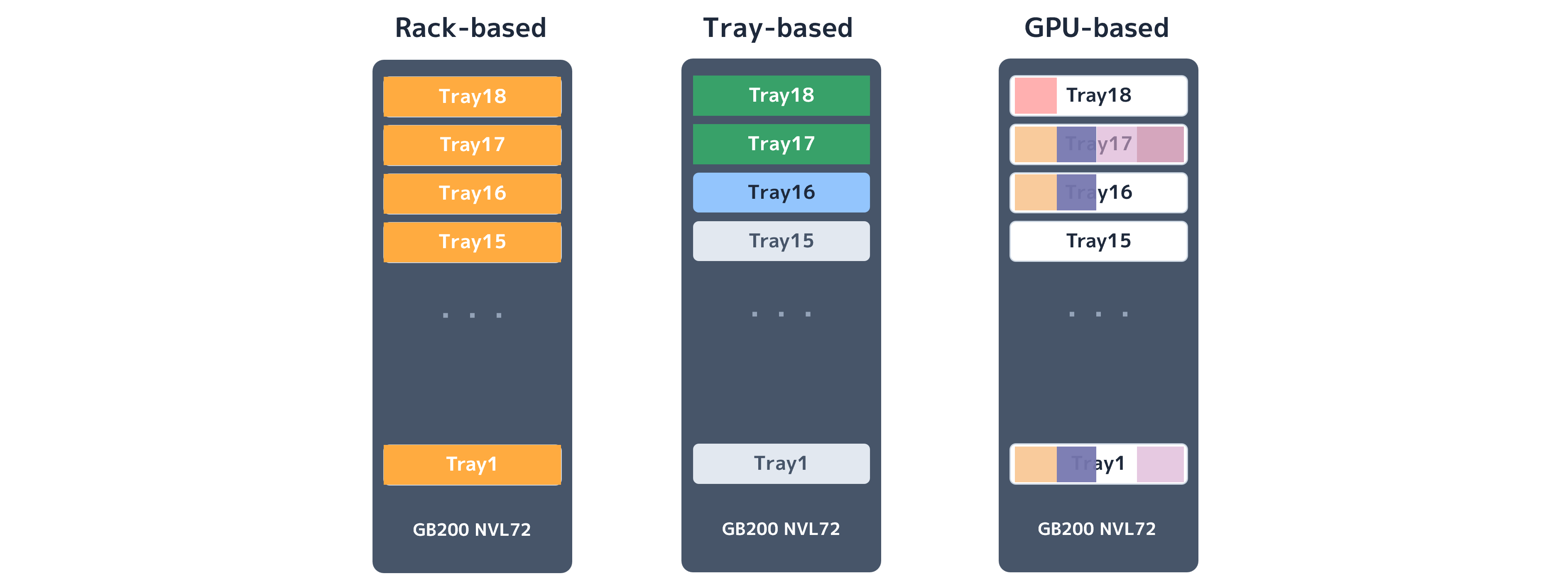
Comparison of SoftBank NVL72 GB200 Provisioning Models
Rack-Level Provisioning
Rack-level provisioning is intended for users with large-scale workloads.
Allocating an entire rack to a user keeps the configuration simple, making this approach easier to offer as a service than the other provisioning models.
Tray-Level Provisioning
Tray-level provisioning is intended for users with medium-scale workloads.
Compute trays are connected at high speed through NVLink switches. When trays are assigned to multiple users, logical isolation is therefore required on the NVLink switches as well.
SoftBank partitions the NVLink switches to provide logical isolation according to user requirements.
GPU-Level Provisioning
Finer-grained, GPU-level provisioning makes it possible to allocate resources to users with smaller workloads. However, partitioning GPU resources alone is not sufficient.
Resources such as CPUs and memory must also be considered for virtualization, and the network must provide isolation between tenants. Finer-grained provisioning may therefore improve resource efficiency, but it also increases implementation and operational costs.
Taking these trade-offs into account, SoftBank currently provides GB200 resources at the rack and tray levels, rather than at the individual GPU level.
2. Challenges Encountered During Deployment
The following sections describe the challenges we encountered during the actual deployment.
When building AI computing infrastructure, it is important to bring the service online as soon as possible after procuring the GPUs. The longer the GPUs remain idle, the longer the substantial upfront investment goes underutilized.
As network engineers, we therefore faced a range of challenges in deploying the infrastructure quickly while delivering a high-quality network.
Managing Cabling at Scale
Cabling is a major challenge for network engineers.
Large-scale AI networks require extensive cable connection schedules. Any errors in these schedules translate directly into cabling errors on-site.
To address this challenge, we standardized the physical configuration as much as possible. Simplifying the physical layout also makes cable connection schedules easier to prepare.
For example, within each Scalable Unit, we standardize the layout as GPU rack, network rack, and GPU rack, and define the cables and cable routes between GPU servers and switches in advance.
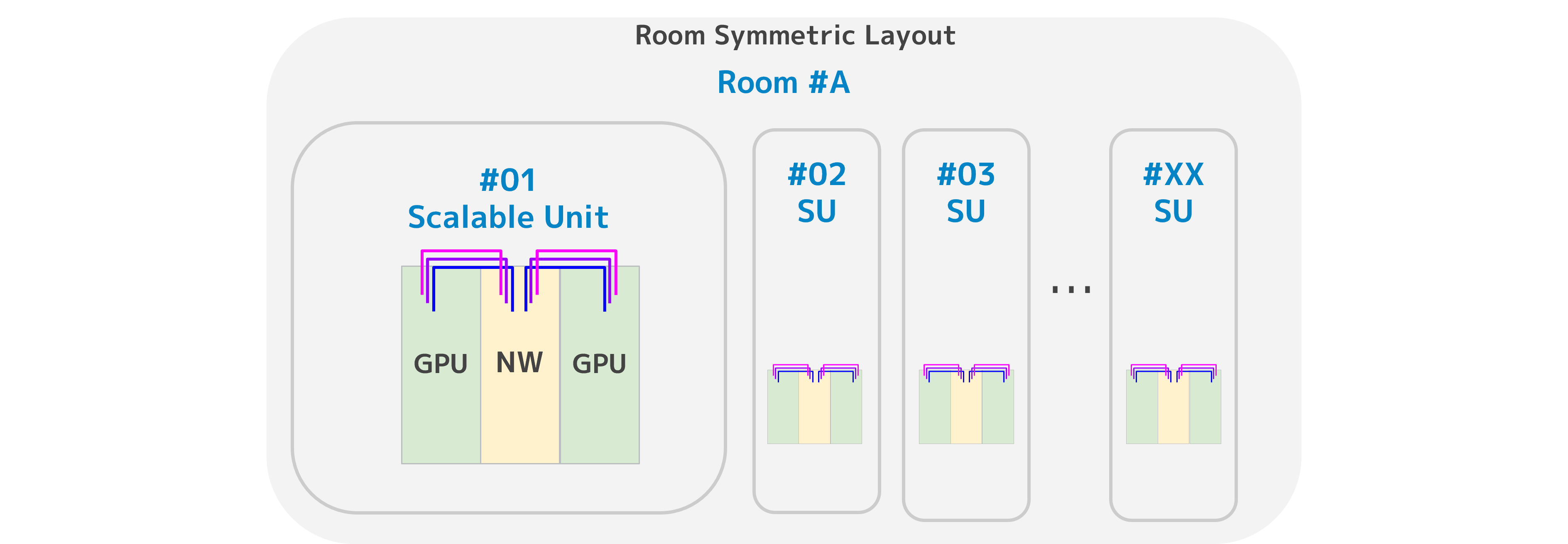
Symmetrical Design Within a Room
By using a symmetrical design with the same configuration on both sides, as illustrated in the inter-room layout below, we can add Scalable Units by effectively “copying and pasting” the existing configuration.
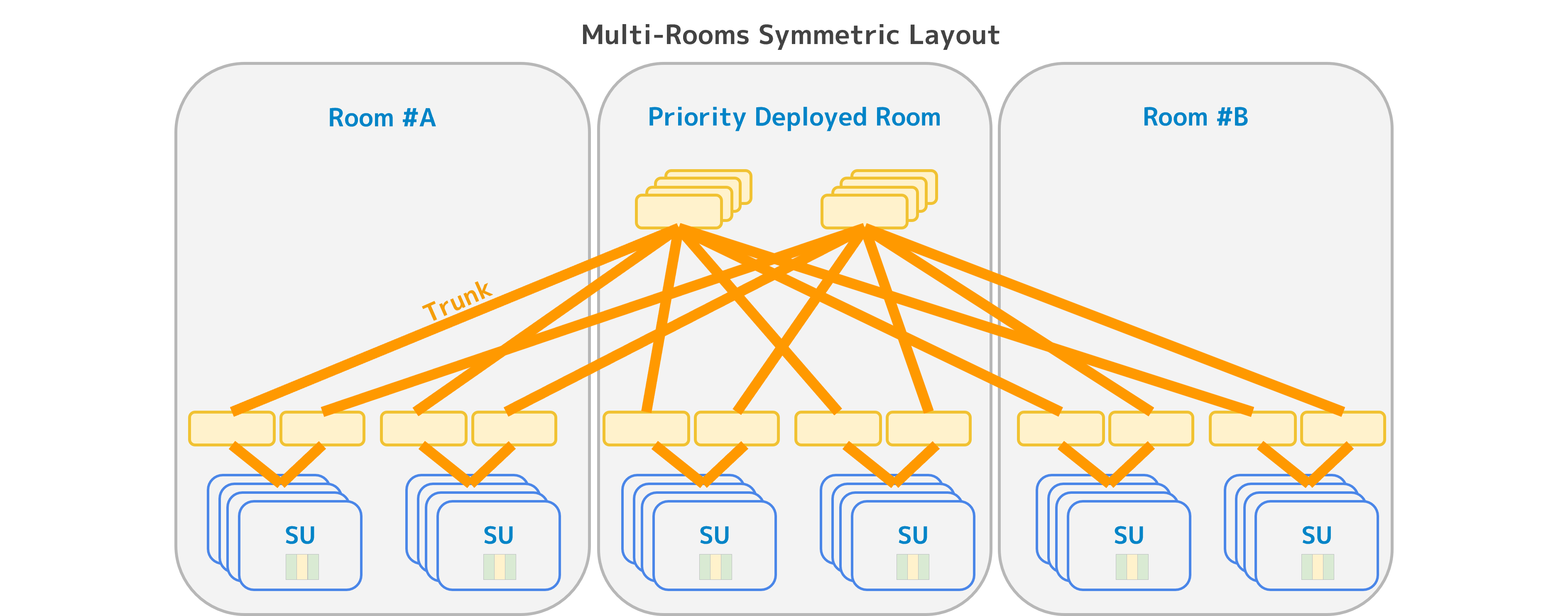
Symmetrical Design Between Rooms
Low Throughput on Specific Links
After the cabling work was completed, another problem emerged.
After connecting the GPUs to the switches, we measured performance across all links and found that some were performing well below their expected throughput.
However, on-site checks showed the following:
・The LEDs indicated normal operation.
・The link status was UP.
・The optical signal was within the normal range.
These were the conditions we observed on-site.
At first glance, the links appeared healthy. The path from a GPU to a switch includes many components, such as the NIC, optical transceivers, fiber, connectors, and breakout boards.
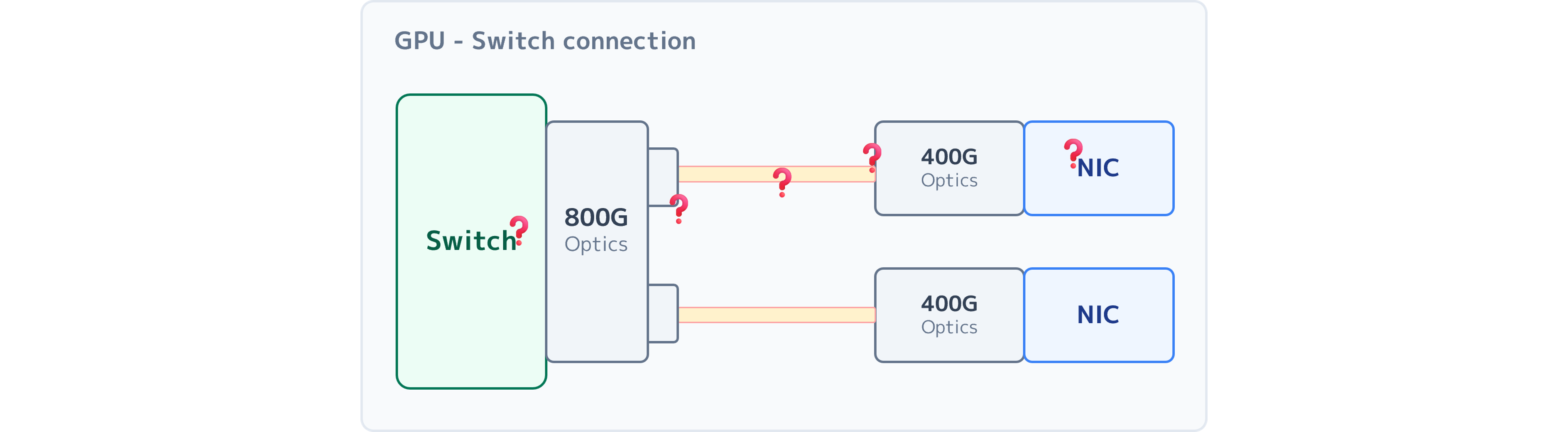
Cabling Between an 800G Switch and Compute Tray NICs
We had to isolate the source of the problem one component at a time.
Through our investigation and discussions with optical transceiver developers, BER and FEC emerged as key clues.
Detecting Physical-Layer Issues with BER
The bit error rate (BER) measures the proportion of received bits that contain errors.
For example, one error in a billion bits is expressed as “1E-9.” In general, a lower value indicates better link quality.
For troubleshooting, if BER values below 1E-8 are treated as normal, a lane with BER > 1E-7 is considered abnormal.
When we investigated an affected 400G interface, we found that BER had deteriorated to 1E-6 on only some of its four lanes, as shown in the abnormal pattern in the figure below.
Replacing the optical transceiver brought BER back within the normal range and resolved the throughput issue.
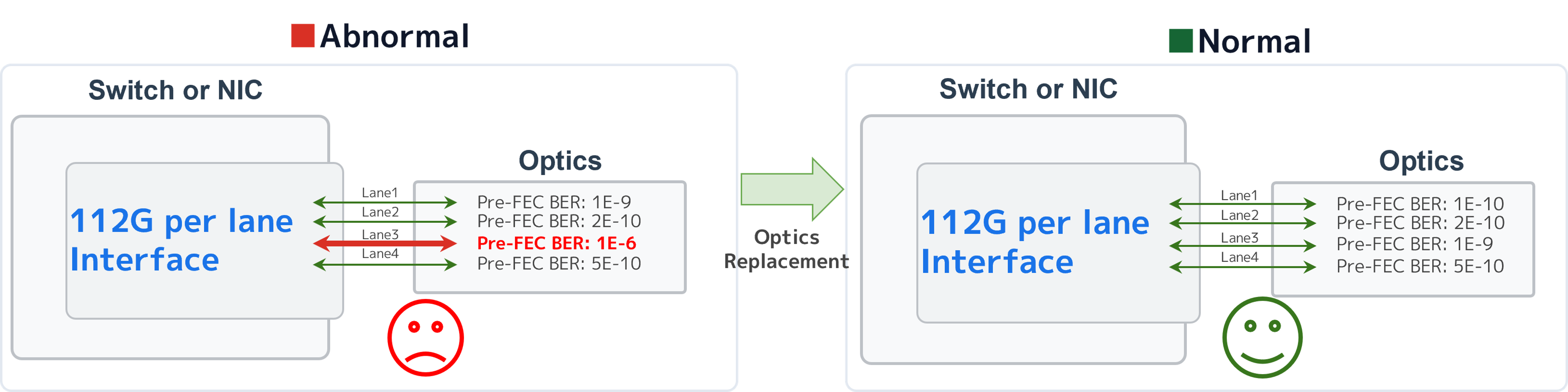
BER Before and After Optical Transceiver Replacement
Detecting Degradation Before Failure with FEC Statistics
Forward error correction (FEC) statistics show the extent to which bit errors are being corrected.
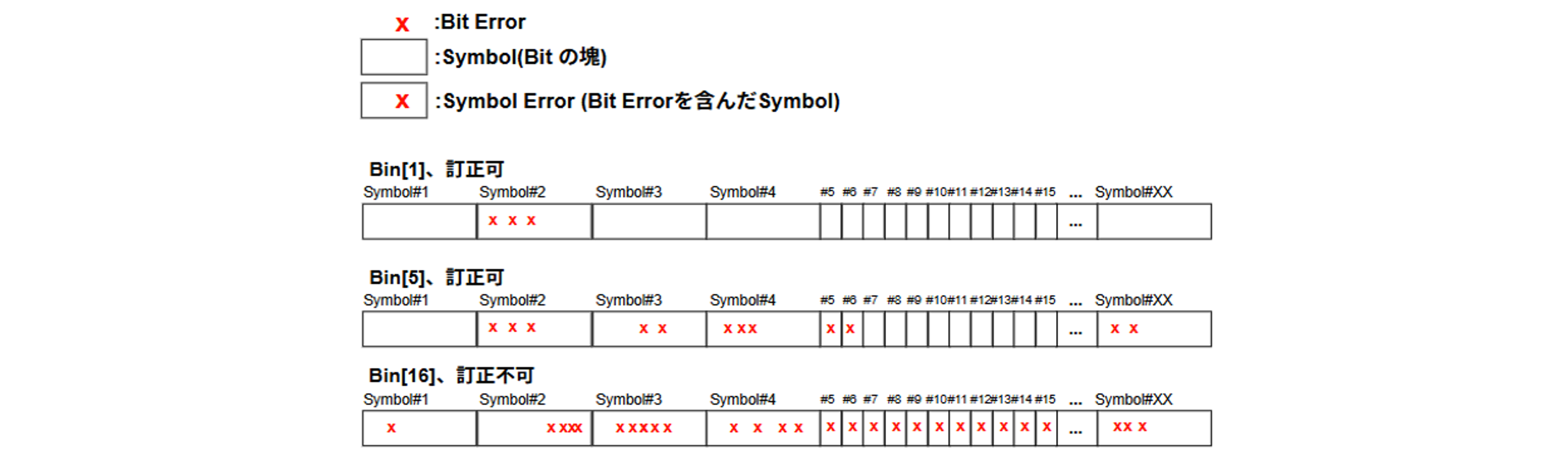
Illustration of FEC and Symbol Errors
In FEC, a group of bits is called a symbol, and a symbol containing a bit error is counted as a symbol error. The histogram label “Bin[XX]” indicates the number of symbol errors detected.
In Ethernet's RS-FEC algorithm, Bin[0] through Bin[15] represent correctable errors, while Bin[16] and above are uncorrectable. Increasing counts in higher-numbered bins can indicate deteriorating link quality.
Examining FEC statistics helps us understand how many errors are occurring on a link and how effectively they are being corrected.
In the abnormal pattern below, the FEC symbol-error distribution showed counts extending up to Bin[15]. Based on this observation, we judged that symbol errors might be exceeding the correction limit, potentially leaving some packets uncorrected and contributing to the link problem.
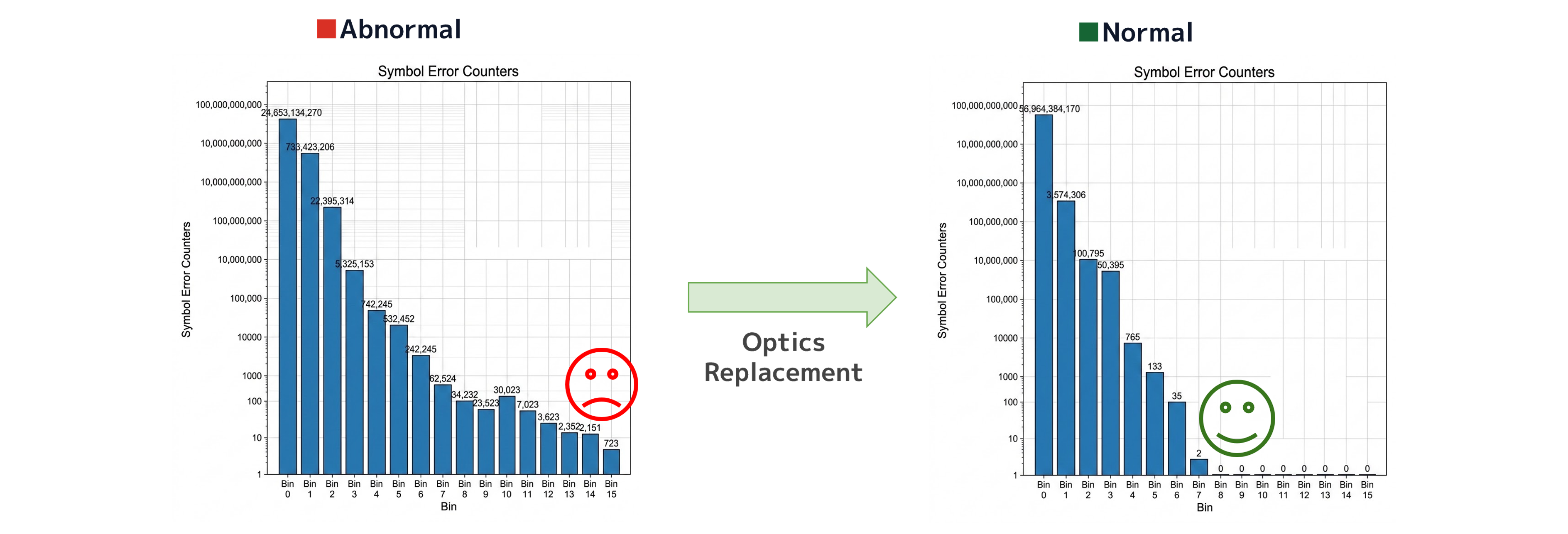
FEC Histograms Before and After Optical Transceiver Replacement
After we replaced the affected optical transceiver, the error distribution improved and throughput returned to normal.
This experience taught us that “link up” does not necessarily mean “healthy.” Monitoring only for interfaces going down, as we had done previously, cannot detect a gradual deterioration in link quality.
We are therefore considering a shift toward monitoring that uses metrics such as BER and FEC to detect signs of degradation before they develop into visible failures.
Considering AECs as an Alternative to Optics
Our experience with optical transceiver failures also prompted us to consider whether we could select components that were less prone to failure. One option is the active electrical cable (AEC).
An AEC transmits high-speed electrical signals over copper, with signal-processing integrated circuits (ICs) at both ends of the cable.
Optical transceivers contain multiple optical components, including lasers. AECs, by contrast, use copper and have no optical components. Their relatively simple construction also offers the benefit of lower procurement costs.
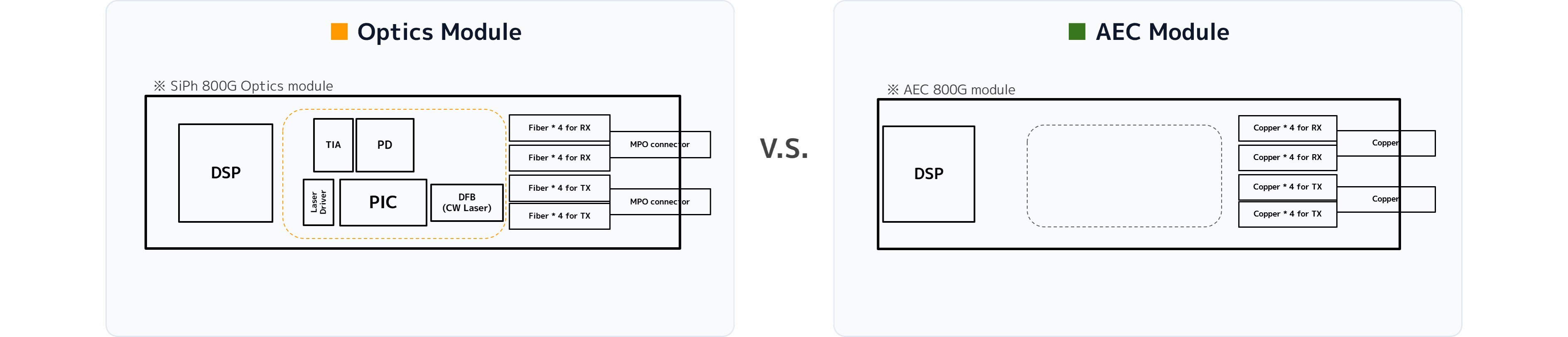
Components Inside Optical Transceiver and AEC Modules
AECs do have a cable-length limit of up to 7 m at 800G, but with careful rack placement and cable routing, they can also be used with rack-scale GPU servers.
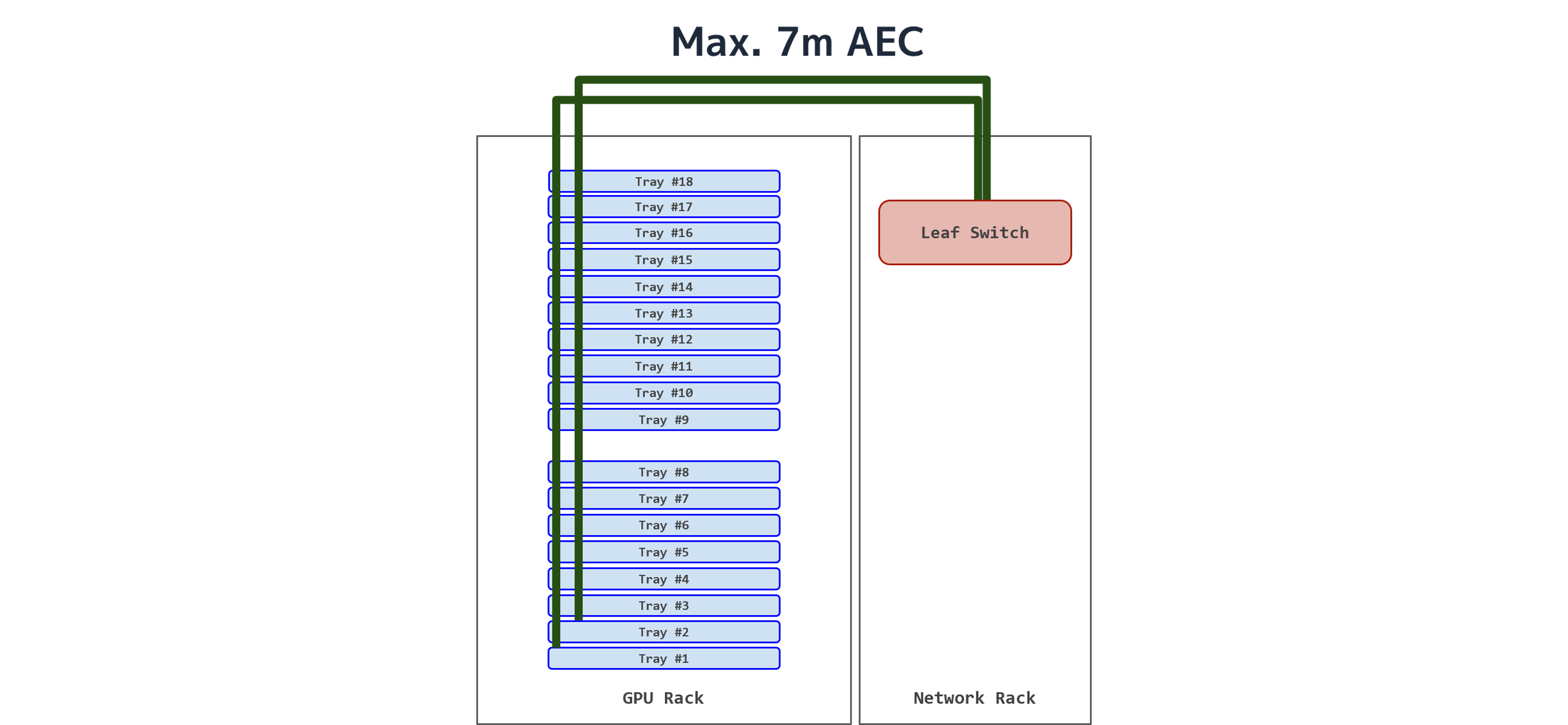
Inter-Rack Cabling with an 800G-to-2x400G AEC
We had previously assumed that scale-out networks should use optical connections, but we learned that copper can also be an option, depending on the physical configuration.
Trapped Air as a Cause of Liquid-Cooling Problems
During the rack-scale GPU server deployment, we also encountered problems specific to liquid cooling.
After replacing a failed tray with a new unit, we observed a gradual decline in cooling performance across the entire rack. Our investigation revealed that the replacement tray had not been completely filled with coolant and still contained trapped air.
This air entered the cooling loop and obstructed coolant circulation, reducing cooling performance throughout the rack.

Identifying and Resolving the Cooling Performance Issue
As liquid-cooled switches and other equipment become more common, these issues will no longer be the concern of server engineers alone. Network engineers will also need to understand and monitor coolant temperature, pressure, flow rate, and condition.
Four Lessons from Deploying Rack-Scale GPU Servers
This deployment provided four main lessons.
1. Network Engineers Need to Understand Facilities, Too
For AI computing infrastructure, understanding networking alone is not enough. Engineers need a broader understanding of the entire physical infrastructure, including power, liquid cooling, server components, optics, and cables.
2. Understand the Unique Characteristics of Rack-Scale GPU Servers
Rather than simply applying conventional GPU server designs, we need to design the entire rack as a single system.
3. Rethink Established Methods to Accelerate Deployment
Revisiting established methods can accelerate deployment and reduce costs. Examples include standardizing physical configurations, simplifying cabling, using high-density patch panels, carrying management traffic over the underlay network, and considering AECs.
4. Work Directly with Developers to Deepen Technical Understanding
Some problems are difficult to resolve using on-site experience alone, as demonstrated by our use of BER and FEC to diagnose reduced throughput.
Deepening our technical understanding through discussions with developers helps us identify the causes of even complex failures more quickly.
3. Conclusion
The arrival of rack-scale GPU servers has significantly expanded the scope of network engineering.
Beyond Ethernet fabric design, we must consider rack power architecture, liquid-cooling equipment, optics, cabling, physical-layer quality, and even GPU resource provisioning as parts of a single system.
In large-scale AI networks in particular, assumptions such as “the link is up, so it must be healthy” or “the configuration is the same as before, so it should be fine” do not always hold.
Building reliable AI computing infrastructure requires a deep understanding of the physical layer and a cross-disciplinary design approach that encompasses facilities and servers. It is also essential to feed the data gathered during deployment and operations back into future designs.
Building networks for rack-scale GPU servers truly is a process of overcoming one challenge after another.
We will apply the lessons from this deployment to building and operating larger, more reliable AI computing infrastructure in the future.
References and Related Links
JANOG58 MEETING in Matsuyama, “The Challenges of Network Design and Operations for Rack-Scale GPU Server Deployments” presentation slides by 内田 泰広 and Chaocheng Chang
JANOG58 in Matsuyama, “The Challenges of Network Design and Operations for Rack-Scale GPU Server Deployments” archived recording (Available through Sunday, Jan 31, 2027)
AI Computing Infrastructure Powered by NVIDIA GB200 NVL72 Begins Operation
JANOG57 in Osaka, lightning talk, “Toward a Reliable 800G Data Center Network: Measuring Transceiver BER”
SONiC Workshop Japan 2025, “Testing 800G AEC Cables with SONiC”
Author