Outgoing call from Japan
You can make outgoing international phone calls easily from Japan by including the international code "+" or "010" before entering the phone number of the person you want to call on your SoftBank mobile phone.
How to make an international phone call
Example: Making a phone call to the UK
(phone number: 01XXX-XXXXXX)
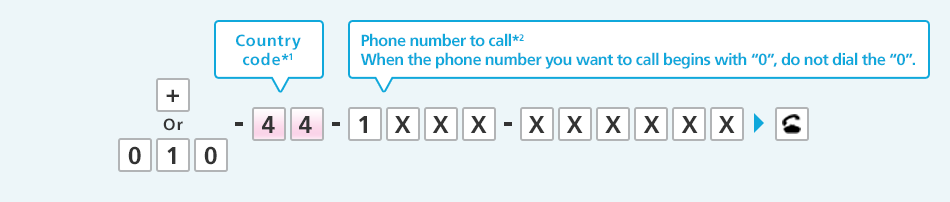
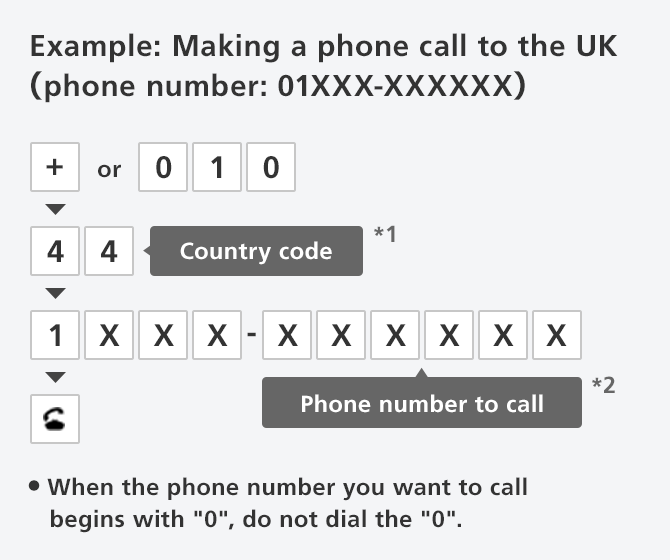
- When making a call to a mobile operator in Thailand, add "8" after the country code.
- For outgoing phone calls to a mobile phone in San Marino, add "39". For outgoing phone calls to a fixed line in San Marino, add "378".
- For outgoing phone calls to a mobile phone in Monaco, add "33". For outgoing phone calls to a fixed line in Monaco, add "377".
- For outgoing phone calls to a fixed line in Italy, add "0"
Notes
- Aside from "+" and "010", you can also make a phone by pressing "0046" (SoftBank operator identification number) + "010" + "country code" + "phone number to call".
- "+" and "010" are abbreviated numbers of "0046010".
- If you use an operator identification number besides "0046", we recommend that you dial the number or configure the country code on your mobile phone in advance.
- If you do not configure the country code and make an outgoing phone call from your call history, the country code "0046010" will be automatically added (If you use a country code besides "0046010" on a SAMSUNG phone, make the phone call using the dialer).
- For details on country code settings, see the manual of your phone. You can download the manual (PDF) of your device from the page below.
Data and voice call rates
| Signup | Not required |
|---|---|
| Monthly usage fee | Free |
| Voice call rates |
International voice calls Varies according to the time and country/region. |
- SoftBank international voice calls are excluded from free data usage provided by price plans and mail/web discount services.
- SoftBank international voice calls are excluded from flat-rate and discount services with the exception of the specified discount of Blue Plan.
- SoftBank international voice call charges can be checked at the usage status page in My SoftBank. In addition, you can also use a "usage notification service" that sends a notification message to you if usage charges exceed a certain amount.
- Even if your voice call does not connect, voice call charges may incur depending on the local operator.