
フォーム読み込み中



Cloud FunctionsでVMインスタンスを自動停止、起動する手順

クラウドエンジニア
結城 翔斗
オンプレミス企業でテクニカルサポート、プロジェクトマネージャーの経験を経て2020年にソフトバンク株式会社に入社し、Alibaba Cloudのプロダクトに関するテクニカルサポート業務に従事。
2023年3月22日掲載

ご覧いただきありがとうございます。ソフトバンクの結城です。
今回はGoogle CloudのCloud Functionsを使ってCompute Engineを自動停止、起動する方法について紹介します。
はじめに
ほとんどのパブリッククラウドではサブスクリプションと従量課金の両方の課金方式が用意されています。パブリッククラウドで24/365稼働のサーバ(Webサーバなど)を動かす場合は、費用対効果が高いサブスクリプションタイプを選択、一定時間のみ利用する、一時的な検証で利用するといった場合は従量課金タイプの課金方式を選択することが多いと思います。
特定の時間のみ利用する場合は、手動でインスタンスの起動、停止を行う場合があると思います。しかし、毎回手動で起動、停止するのは手間が掛かります。
また、従量課金タイプのインスタンスでは、マシンの停止忘れ、削除忘れといったことが発生すると、サブスクリプションで購入するより高い金額になってしまう場合があります。
今回は、このような問題を解決するため、VMインスタンスを自動的に停止、起動する方法についてご紹介いたします。
【こんな場合にお勧め】
- VMインスタンスを24/365稼働させる必要がなく、業務時間中(例 9:00 ~ 18:00など)のみ自動起動、停止させたい
- VMインスタンスの停止忘れをなくし、無駄なコストを削減したい
- 多くのVMインスタンスを保持しており、特定のインスタンスのみタスクを実行させたい
- VMインスタンスごとに起動時間、停止時間を決めて自動的に操作を実行したい
構築手順
■構成図
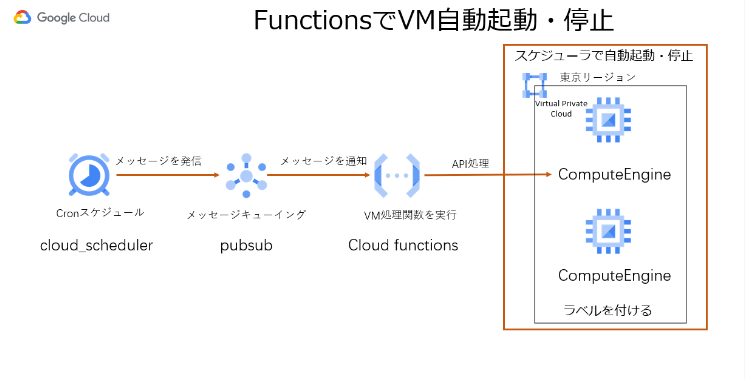
■利用プロダクト
- Comute Engine
- Cloud Functions
- pub / sub
- Cloud Scheduler
■環境情報
・リージョン : 全プロダクト共通して東京リージョン
■事前準備
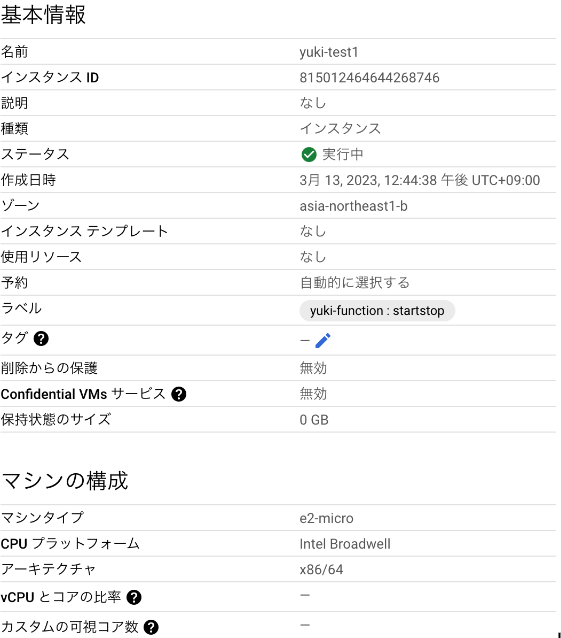
・Compute Engine VMインスタンス2台 / OSは指定なし
※VMインスタンスにはラベルを付ける必要があります。
キー : [任意の名前]-function
値 : startstop
■ 構築手順
●Pub/Subの作成
1-1 ) Google Cloudコンソールにログインし、プロダクト一覧より「Pub/Sub」を選択します。
1-2 ) 「トピックを作成」をクリックし、トピックを作成します。

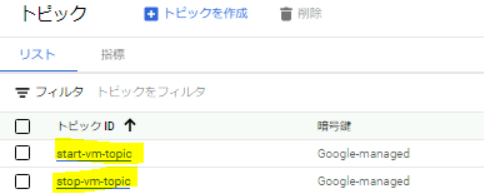
1-3 ) 以下の通り、パラメータを入力し2つのトピックを作成します。※start-vm-topic / stop-vm-topic それぞれトピックの作成をします。
■トピック作成①
トピックID : start-vm-topic
デフォルトのサブスクリプションを追加する
暗号化 : Googleが管理する暗号鍵
■トピック作成②
トピックID : stop-vm-topic
デフォルトのサブスクリプションを追加する
暗号化 : Googleが管理する暗号鍵
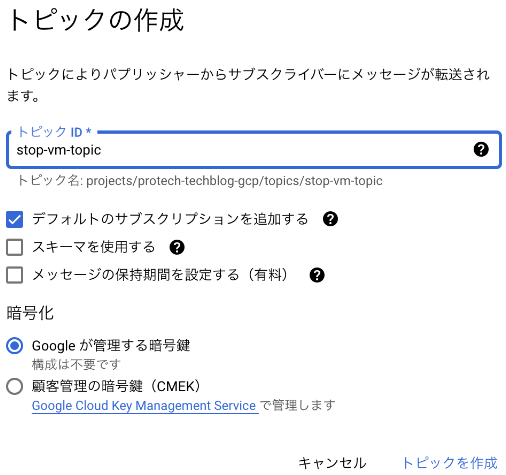
1-4 ) トピックが作成されたか確認します。
●Cloud Functionの作成 / 設定
2-1 ) プロダクト一覧より「Cloud Functions」を選択します。
2-2 ) 「関数の作成」をクリックし、関数を作成します。
※2つの関数を作成するので、別の関数を作成する場合は「関数の作成」をクリックし、別の関数を作成してください。

● 関数①
環境 : 第一世代
関数名 : start-vm
リージョン : asia-northeast1 (日本)
トリガー : Cloud Pub/Sub
Cloud Pub/Subトピック : 1-3で作成したstart-vm-topicを指定
タイムゾーン : 日本標準時 (JST)
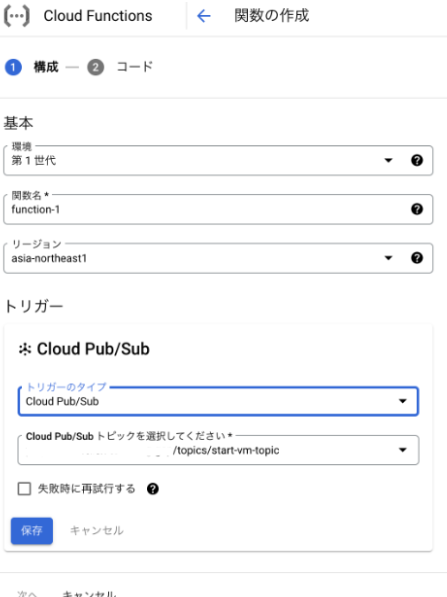
上記、パラメータの指定が完了したら「保存」をクリックし、「次へ」をクリックします。
ランタイム : Python3.9
エントリポイント : start-vm-pubsub
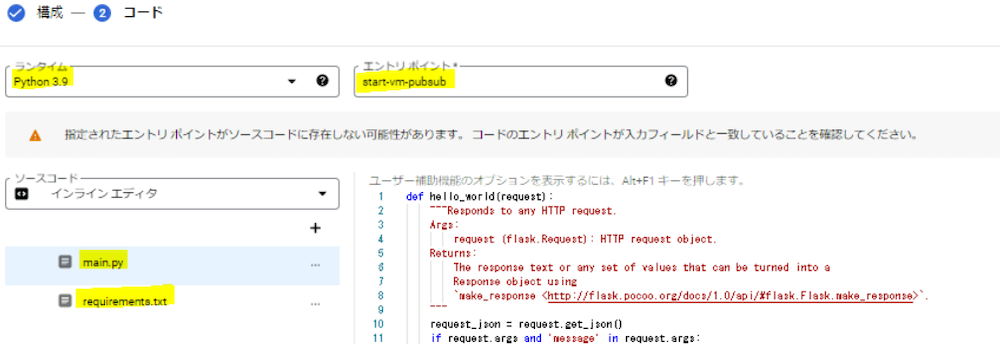
【main.py】
project = "プロジェクト名"は適宜設定してください。
import json
import sys
import base64
import googleapiclient.discovery
from typing import Any


from google.api_core.extended_operation import ExtendedOperation
from google.cloud import compute_v1


compute = googleapiclient.discovery.build('compute', 'v1')
project = "プロジェクト名"
zone = "asia-northeast1-b"


def wait_for_extended_operation(
    operation: ExtendedOperation, verbose_name: str = "operation", timeout: int = 300
) -> Any:
    result = operation.result(timeout=timeout)


    if operation.error_code:
        print(
            f"Error during {verbose_name}: [Code: {operation.error_code}]: {operation.error_message}",
            file=sys.stderr,
            flush=True,
        )
        print(f"Operation ID: {operation.name}", file=sys.stderr, flush=True)
        raise operation.exception() or RuntimeError(operation.error_message)


    if operation.warnings:
        print(f"Warnings during {verbose_name}:\n", file=sys.stderr, flush=True)
        for warning in operation.warnings:
            print(f" - {warning.code}: {warning.message}", file=sys.stderr, flush=True)
    return result


def get_data(event):
    if 'data' in event:
        data = json.loads(base64.b64decode(event['data']).decode('utf-8'))
    else:
        raise RuntimeError('No data in event')
    return data


def get_label(data):
    if 'label' in data:
        label = data['label']
    else:
        raise RuntimeError('No label in data')
    return label


def list_instance_by_label(label_name, label_value):
    label_filter = "labels.{0}={1}".format(label_name, label_value)
    response = compute.instances().list(project=project, zone=zone, filter=label_filter).execute()
    print('Instances in project "%s" and zone "%s" with label "%s" are:' % (project, project, label_name))
    inst_name_list = []
    if (response.get('items')):
        for instance in response['items']:
            print(' - Id:           ' + instance['id'])
            print('   Name:         ' + instance['name'])
            print('   Status:       ' + instance['status'])
            print('   Machine type: ' + instance['machineType'])
            inst_name_list.append(instance['name'])
    else:
        print('NO instances matched')
    return inst_name_list


def start_vm_pubsub(event, context):
    print("EVENT", event)
    data = get_data(event)
    label = get_label(data)
    key = label.split('=')[0]
    val = label.split('=')[1]
    inst_name_list = list_instance_by_label(key, val)
    if len(inst_name_list) == 0:
        print("No matched instance, skip triggering start/stop.")
        return
    for instance_name in inst_name_list:
        print('Instance name is: ' + instance_name)
        instance_client = compute_v1.InstancesClient()
        operation = instance_client.start(project=project, zone=zone, instance=instance_name)
        wait_for_extended_operation(operation, "instance "+ instance_name+" starting")
【requirements.txt】
# Function dependencies, for example:
# package>=version
cachetools==5.2.0
certifi==2022.6.15
charset-normalizer==2.1.0
google-api-core==2.8.2
google-api-python-client==2.56.0
google-auth==2.10.0
google-auth-httplib2==0.1.0
google-cloud-compute==1.5.0
googleapis-common-protos==1.56.4
grpcio==1.47.0
grpcio-status==1.47.0
httplib2==0.20.4
idna==3.3
proto-plus==1.20.6
protobuf==3.20.1
pyasn1==0.4.8
pyasn1-modules==0.2.8
pyparsing==3.0.9
requests==2.28.1
rsa==4.9
six==1.16.0
uritemplate==4.1.1
urllib3==1.26.11
main.py / requirements.txtにcodeの設定が完了したら「デプロイ」をクリックし、関数を作成します。
● 関数②
環境 : 第一世代
関数名 : stop-vm
リージョン : asia-northeast1 (日本)
トリガー : Cloud Pub/Sub
Cloud Pub/Subトピック : 1-3で作成したstop-vm-topicを指定
タイムゾーン : 日本標準時 (JST)
上記、パラメータの指定が完了したら「保存」をクリックし、「次へ」をクリックします。
ランタイム : Python3.9
エントリポイント : stop-vm-pubsub
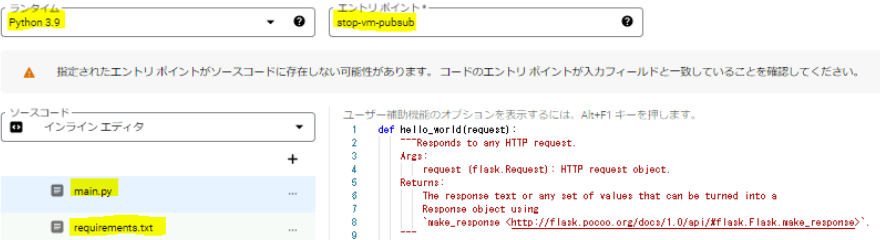
【main.py】
project = "プロジェクト名"は適宜設定してください。
import googleapiclient.discovery
from typing import Any


from google.api_core.extended_operation import ExtendedOperation
from google.cloud import compute_v1


compute = googleapiclient.discovery.build('compute', 'v1')
project = "プロジェクト名"
zone = "asia-northeast1-b"


def wait_for_extended_operation(
    operation: ExtendedOperation, verbose_name: str = "operation", timeout: int = 300
) -> Any:
    result = operation.result(timeout=timeout)


    if operation.error_code:
        print(
            f"Error during {verbose_name}: [Code: {operation.error_code}]: {operation.error_message}",
            file=sys.stderr,
            flush=True,
        )
        print(f"Operation ID: {operation.name}", file=sys.stderr, flush=True)
        raise operation.exception() or RuntimeError(operation.error_message)


    if operation.warnings:
        print(f"Warnings during {verbose_name}:\n", file=sys.stderr, flush=True)
        for warning in operation.warnings:
            print(f" - {warning.code}: {warning.message}", file=sys.stderr, flush=True)
    return result


def get_data(event):
    if 'data' in event:
        data = json.loads(base64.b64decode(event['data']).decode('utf-8'))
    else:
        raise RuntimeError('No data in event')
    return data


def get_label(data):
    if 'label' in data:
        label = data['label']
    else:
        raise RuntimeError('No label in data')
    return label


def list_instance_by_label(label_name, label_value):
    label_filter = "labels.{0}={1}".format(label_name, label_value)
    response = compute.instances().list(project=project, zone=zone, filter=label_filter).execute()
    print('Instances in project "%s" and zone "%s" with label "%s" are:' % (project, project, label_name))
    inst_name_list = []
    if (response.get('items')):
        for instance in response['items']:
            print(' - Id:           ' + instance['id'])
            print('   Name:         ' + instance['name'])
            print('   Status:       ' + instance['status'])
            print('   Machine type: ' + instance['machineType'])
            inst_name_list.append(instance['name'])
    else:
        print('NO instances matched')
    return inst_name_list


def stop_vm_pubsub(event, context):
    print("EVENT", event)
    data = get_data(event)
    label = get_label(data)
    key = label.split('=')[0]
    val = label.split('=')[1]
    inst_name_list = list_instance_by_label(key, val)
    if len(inst_name_list) == 0:
        print("No matched instance, skip triggering stop.")
        return
    for instance_name in inst_name_list:
        print('Instance name is: ' + instance_name)
        instance_client = compute_v1.InstancesClient()
        operation = instance_client.stop(project=project, zone=zone, instance=instance_name)
        wait_for_extended_operation(operation, "instance "+ instance_name+" stopping")
【requirements.txt】
# Function dependencies, for example:
# package>=version
cachetools==5.2.0
certifi==2022.6.15
charset-normalizer==2.1.0
google-api-core==2.8.2
google-api-python-client==2.56.0
google-auth==2.10.0
google-auth-httplib2==0.1.0
google-cloud-compute==1.5.0
googleapis-common-protos==1.56.4
grpcio==1.47.0
grpcio-status==1.47.0
httplib2==0.20.4
idna==3.3
proto-plus==1.20.6
protobuf==3.20.1
pyasn1==0.4.8
pyasn1-modules==0.2.8
pyparsing==3.0.9
requests==2.28.1
rsa==4.9
six==1.16.0
uritemplate==4.1.1
urllib3==1.26.11
main.py / requirements.txtにcodeの設定が完了したら「デプロイ」をクリックし、関数を作成します。
2-3 ) 関数が作成されたことを確認します
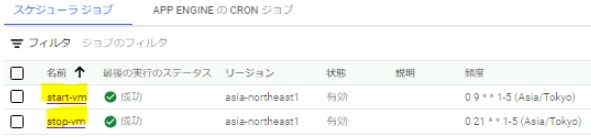
■Cloud Schedulerの設定
3-1 ) プロダクト一覧より「Cloud Sheduler」を選択します。
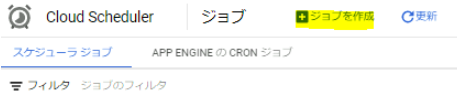
3-2 ) 「ジョブを作成」をクリックし、スケジュールジョブを作成します。
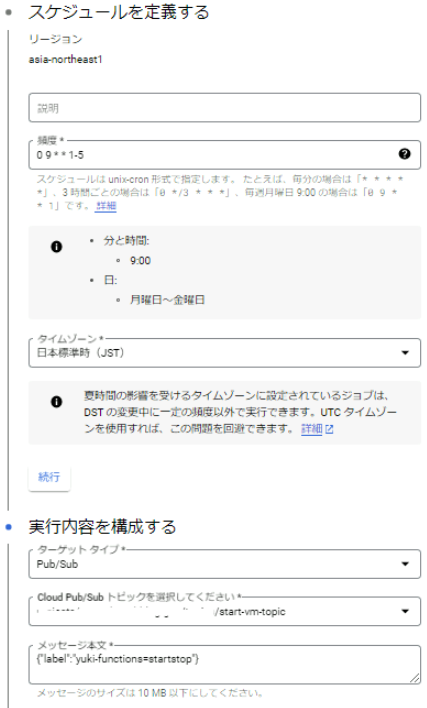
●startジョブの作成
リージョン : asia-northeast1 (日本)
頻度 : 0 9 * * 1-5
タイムゾーン : 日本標準時 (JST)
ターゲットタイプ : Pub/Sub
Cloud Oub/Subトピック : 1-3で作成したstart-vm-topicを指定
メッセージ本文 : {"label":"[VMインスタンスにつけたラベル名]=startstop"}
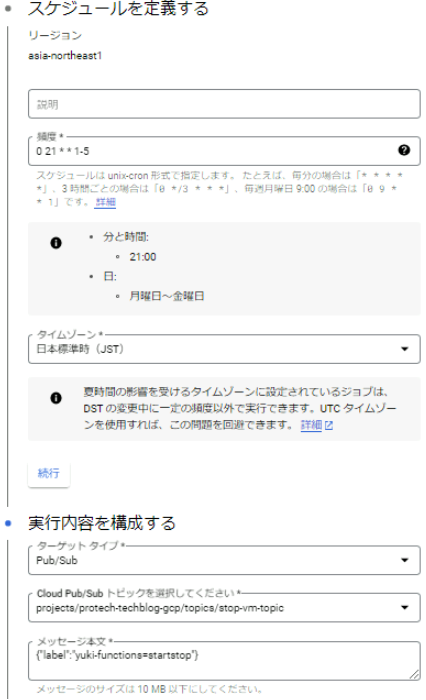
●stopジョブの作成
リージョン : asia-northeast1 (日本)
頻度 : 0 21 * * 1-5
タイムゾーン : 日本標準時 (JST)
ターゲットタイプ : Pub/Sub
Cloud Oub/Subトピック : 1-3で作成したstop-vm-topicを指定
メッセージ本文 : {"label":"[VMインスタンスにつけたラベル名]=startstop"}
3-3 ) スケジュールジョブが作成されたことを確認します。
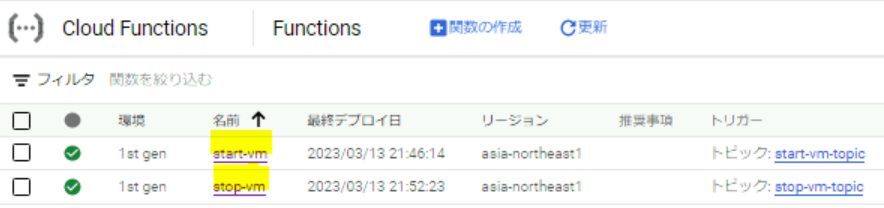
設定は以上です。
■動作確認
4-1 ) VMインスタンスが起動していることを確認します。
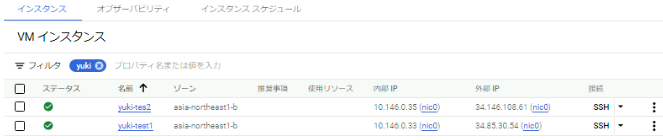
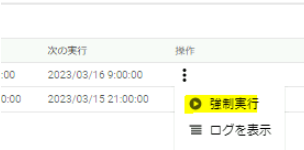
4-2 ) Cloud Schedulerを開き、作成した「stop-vm」を強制実行します。
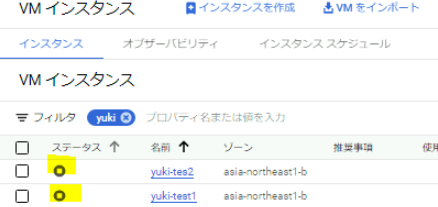
4-3 ) VMインスタンスが停止したことを確認します。
4-4 ) Cloud Schedulerを開き、作成した「start-vm」を強制実行します。
4-5 ) VMインスタンスが起動したことを確認します。
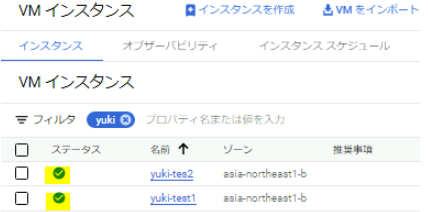
動作確認は以上となります。
さいごに
今回はVMインスタンスを特定の時間に自動停止、自動起動する設定方法についてご紹介させていただきました。特定の時間のみ利用する場合はご紹介させていただいた方法をぜひ使ってみてください。
また、検証環境だとよくインスタンスの停止忘れがあると思います。ご紹介させていただいた方法だと手動で停止する必要がなく、自動的にインスタンスを停止するため、停止忘れといった問題を防ぐことができます。このような問題を解決したい場合、自動停止ジョブのみを作成いただき、ご活用ください。
関連サービス
\ 業務課題をデジタルで支援 /
デジタルツールの選定から導入の手引きまで、中小規模のお客さまへわかりやすくお伝えします。
メールマガジン登録(無料)
ビジネスに役立つ記事やウェビナー情報をお届けします。
おすすめの記事
条件に該当するページがございません