
フォーム読み込み中



AlibabaCloud ECSを定期的に自動再起動する設定方法

康 偉
2020年2月、ソフトバンクにJoinし、現在プロダクト技術2課に配属しております。
AlibabaCloudのプロダクト全般の技術サポートを行っております。また、
重要顧客のVOCの実現やTAM活動なども担当させて頂いております。
SBKKにJoinする前、OracleDBのサポートやC言語により組み込み系開発の
仕事を携わってきました。
宜しくお願い致します。
2023年2月24日掲載

皆さんこんにちは。クラウドエンジニアのKangです。
この記事ではOperation Orchestration Service(OOS)サービスとCloud Assistant Commandを利用して、AlibabaCloud ECSを定期的に自動再起動する設定方法を紹介します。
- 定期メンテナンスやWindows Updateなどにより、ECSインスタンスを定期的に再起動したい方向け
- この記事ではOOSサービスとCloud Assistantを利用してECSを定期的に自動再起動する方法を紹介
- ある程度、仮想サーバとPythonの知識がある事を前提にしています
- 自動再起動を設定する事で、毎日手動で実施する手間が省けます
はじめに
定期メンテナンスやWindows Updateなどにより、ECSインスタンスを定期的に再起動して運用するシナリオがあります。ただ、毎回手動でコンソールから再起動を実施するのは手間がかかるため、今回ECSインスタンスを定期的に自動再起動する2つの設定方法を紹介したいと思います。
方法1はAlibabaCloud社が提供するオペレーションオーケストレーションサービス (OOS)を利用することで、一括で複数台のECSを自動停止・起動するタスクの設定方法を紹介します。
方法2はAlibabaCloud ECSコンソールに付属しているCloud Assistant Commandsを利用し、Pythonスクリプトを定期的に実行することで実現しております。
1. 方法1、Operation Orchestration Service(OOS)を利用する
1.1 Operation Orchestration Serviceの概要
オペレーション オーケストレーション サービス (OOS) は、Alibaba Cloud社が提供する自動化された運用および保守 (O&M) サービスであり、O&Mタスクの管理と実行を支援します。 テンプレートを使用して、タスクオーダー、入力パラメーター、出力パラメーターなどのO&Mタスクを定義できます。 O&Mタスクは、テンプレートで定義した通りに自動的に実行されます。 OOSを使用して、Elastic Compute Service (ECS)、ApsaraDB for RDS、Server Load Balancer (SLB)、Virtual Private Cloud (VPC) などのさまざまな Alibaba Cloudサービスを管理できます。
1.2 実行手順
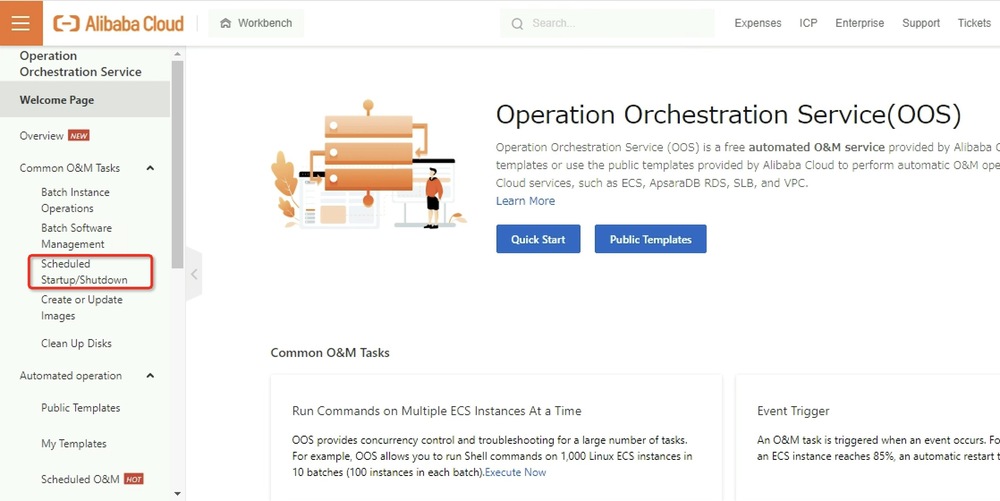
1.OOSコンソールにログインし、左側のメニューから[Scheduled Startup/Shutdown]をクリックします。
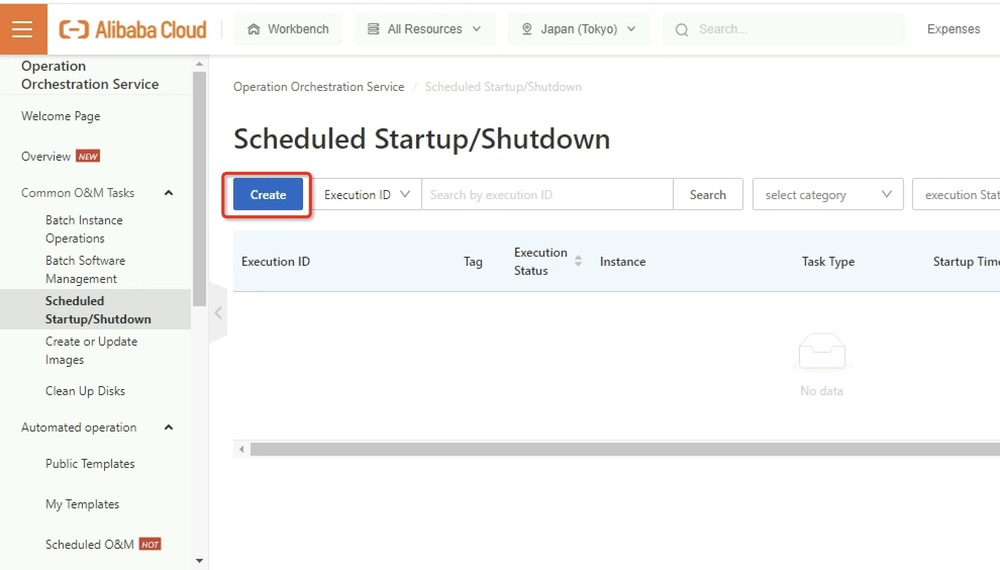
2.[Create]ボタンをクリックし、計画起動・停止タスクを作成します。
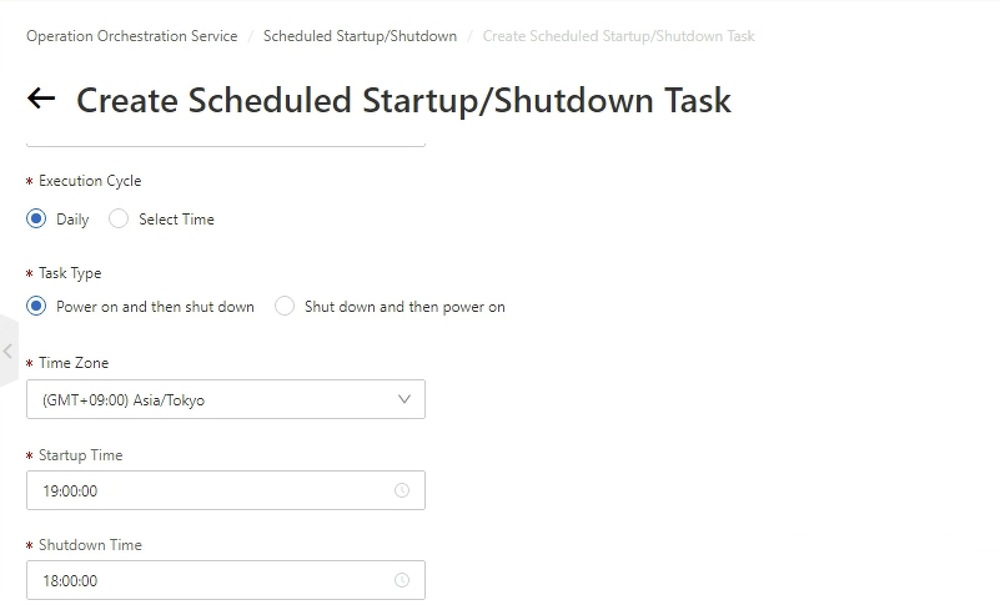
3.以下のタスクの詳細項目を入力します。
Task Name -> [適当な名前を入力する]
Execution Cycle -> [Daily]
Task Type -> [Shut down and then power on]
Time Zone -> [(GMT+09:00)Asia/Tokyo]
StartupTime / ShutdownTime-> 実行したい時間を入力する
End Time -> タスクを永続的に停止したい時間を入力する。
Stop Mode -> [No Billing]
Permissions -> [Default Service-linked Role]
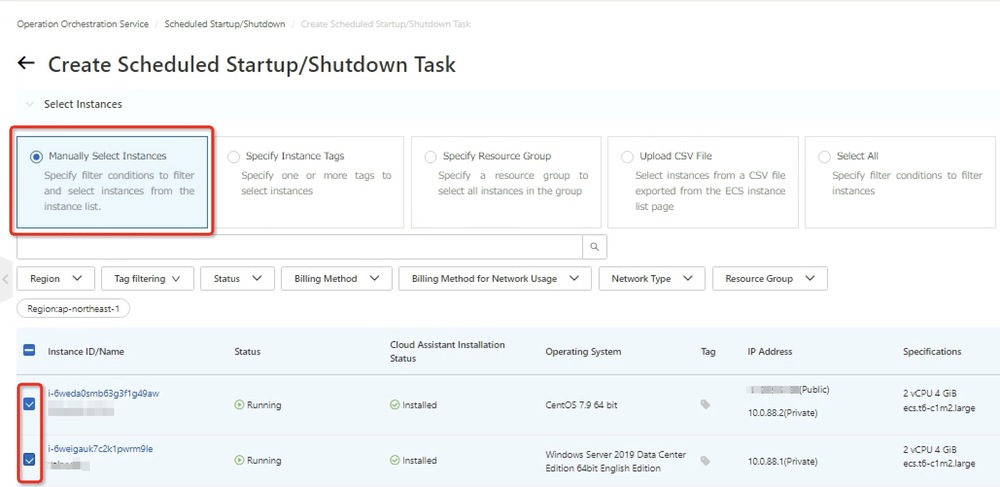
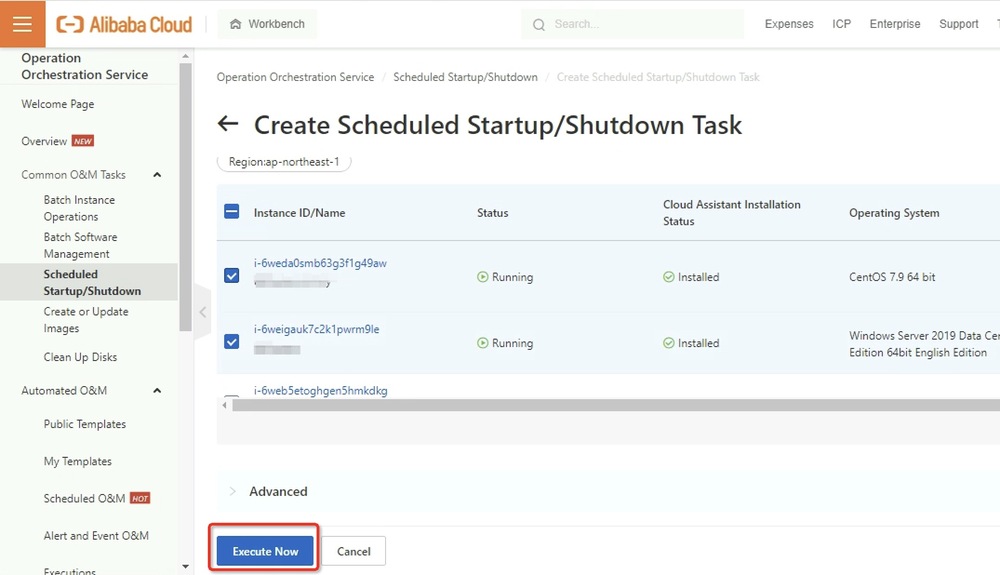
4.自動再起動対象となるECSインスタンスを選択します。
5.[Execute Now]をクリックし、タスクを実行します。
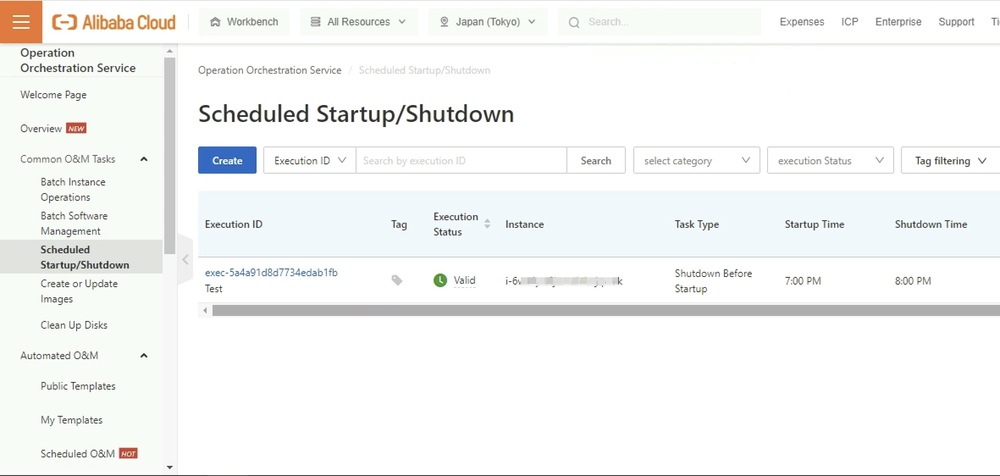
6.自動タスクが作成されていることを確認します。
2. 方法2、Cloud Assistant Commandsを利用する
2.1 Cloud Assistant Commandsの概要
Cloud Assistant コマンドを使用して、Elastic Compute Service (ECS) インスタンスで日常的なタスクを実行できます。 これらのタスクには、自動化された O&M スクリプトの実行、プロセスのポーリング、ユーザ パスワードのリセット、ソフトウェアのインストールまたはアンインストール、アプリケーションの更新、およびパッチのインストールが含まれます。 コマンド タイプは、Windows インスタンスの場合はバッチまたは PowerShell、Linux インスタンスの場合はシェルにすることができます。 カスタム パラメーターを Cloud Assistant コマンドの変数として指定できます。
2.2 実行手順
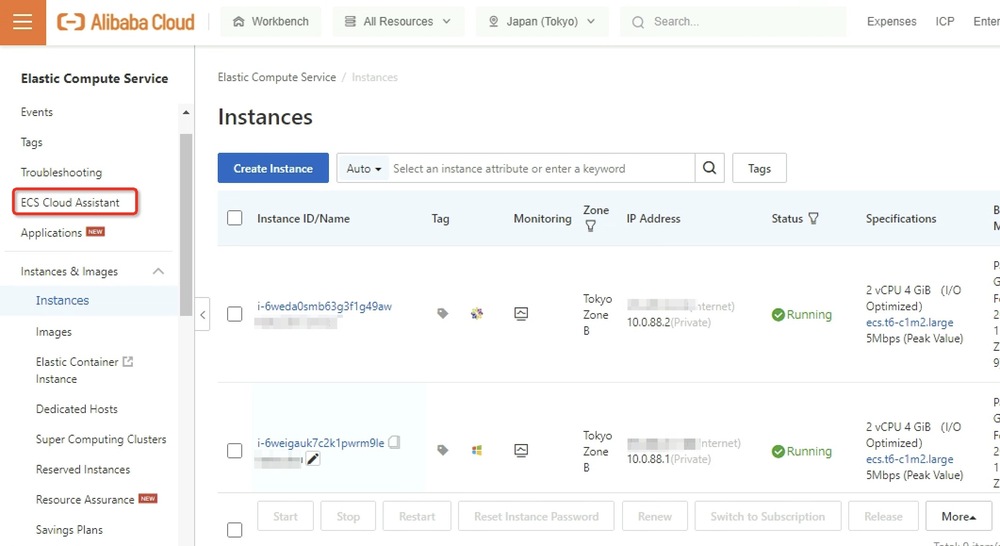
1.以下に示すように、ECSコンソールにログインし、左側のメニューから[Cloud Assistant] をクリックします。
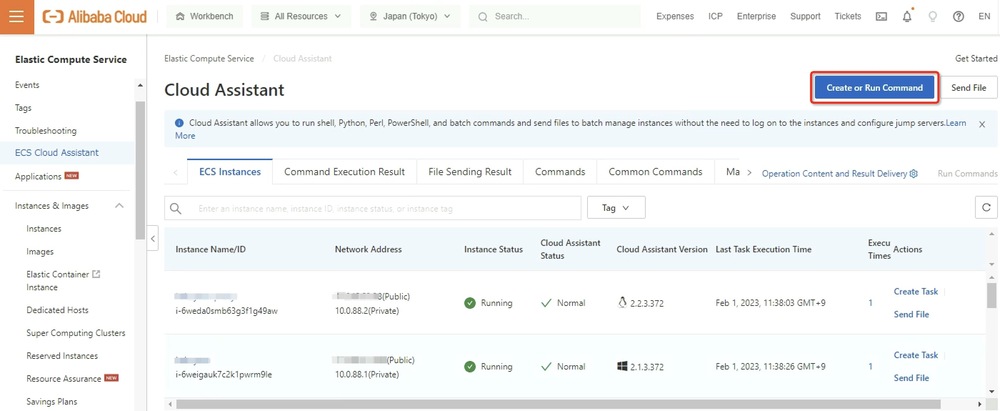
2.右上の[Create or Run Command] をクリックします。
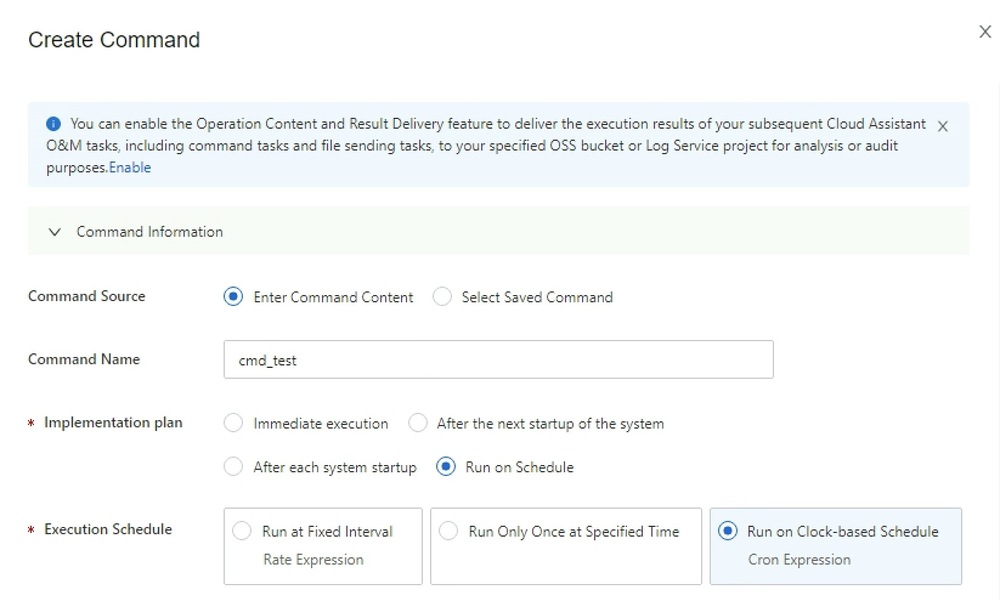
3. Create Commandページで、以下の項目を入力します。
Command Source -> [Enter Command Content]
Command Name -> 適当な名前を入力する
Implementation plan -> [Run on Schedule]
Execution Schedule -> [Run on Clock-based Schedule]
Execution Frequency -> 実行したい時間帯を入力する
Time Zone -> [(GMT+09:00)Asia/Tokyo]
Command Type -> [Python]
4. Commandの箇所、以下のPythonスクリプトを入力して、[Run]をクリックし、スクリプトを実行します。
- <yourAccessKeyID>、<yourAccessKeySecret>、<yourRegionId>はご自身が利用しているものに書き換えてください。
- AccessKeyID、AccessKeySecretの取得方法は公式ドキュメント「Create an AccessKey pair」をご参照ください。
- RegionIdの一覧は以下の公式ドキュメント「Regions IDs」で確認できます。
- ins_ids= ["i-bp185fcs****","i-bp14wwh****","i-bp13jbr****"]の中、"i-bp185fcs****"の箇所、実際に実行したいECSインスタンスIDをご入力ください。
# coding=utf-8
# If the Python sdk is not installed, run 'sudo pip install aliyun-python-sdk-ecs'.
# Make sure you're using the latest sdk version.
# Run 'sudo pip install --upgrade aliyun-python-sdk-ecs' to upgrade.

import json
import sys
import base64
import time
import logging
from aliyunsdkcore.client import AcsClient
from aliyunsdkcore.acs_exception.exceptions import ClientException
from aliyunsdkcore.acs_exception.exceptions import ServerException
from aliyunsdkecs.request.v20140526.RunCommandRequest import RunCommandRequest
from aliyunsdkecs.request.v20140526.DescribeInvocationResultsRequest import DescribeInvocationResultsRequest
from aliyunsdkecs.request.v20140526.RebootInstancesRequest import RebootInstancesRequest
from aliyunsdkecs.request.v20140526.DescribeInstancesRequest import DescribeInstancesRequest

# Configure the log output formatter
logging.basicConfig(level=logging.INFO,
                    format="%(asctime)s %(name)s [%(levelname)s]: %(message)s",
                    datefmt='%m-%d %H:%M')

logger = logging.getLogger()

access_key = '<yourAccessKey ID>'  # The AccessKey ID you obtained.
access_key_secret = '<yourAccessKey Secret>'  # The AccessKey secret you obtained.
region_id = '<yourRegionId>'  # The region ID you obtained.

client = AcsClient(access_key, access_key_secret, region_id)

def base64_decode(content, code='utf-8'):
    if sys.version_info.major == 2:
        return base64.b64decode(content)
    else:
        return base64.b64decode(content).decode(code)

def get_invoke_result(invoke_id):
    request = DescribeInvocationResultsRequest()
    request.set_accept_format('json')

    request.set_InvokeId(invoke_id)
    response = client.do_action_with_exception(request)
    response_details = json.loads(response)["Invocation"]["InvocationResults"]["InvocationResult"]
    dict_res = { detail.get("InstanceId",""):{"status": detail.get("InvocationStatus",""),"output":base64_decode(detail.get("Output",""))}  for detail in response_details }
    return dict_res

def get_instances_status(instance_ids):
    request = DescribeInstancesRequest()
    request.set_accept_format('json')
    request.set_InstanceIds(instance_ids)
    response = client.do_action_with_exception(request)
    response_details = json.loads(response)["Instances"]["Instance"]
    dict_res = { detail.get("InstanceId",""):{"status":detail.get("Status","")} for detail in response_details }
    return dict_res

def run_command(cmdtype,cmdcontent,instance_ids,timeout=60):
    """
    cmdtype: the command type, which can be RunBatScript, RunPowerShellScript, or RunShellScript.
    cmdcontent: the command content.
    instance_ids: the IDs of the instances on which you want to run the command.
    """
    try:
        request = RunCommandRequest()
        request.set_accept_format('json')

        request.set_Type(cmdtype)
        request.set_CommandContent(cmdcontent)
        request.set_InstanceIds(instance_ids)
        # The timeout period for running the command. Unit: seconds. Default value: 60. Specify this parameter based on the command that you want to run.
        request.set_Timeout(timeout)
        response = client.do_action_with_exception(request)
        invoke_id = json.loads(response).get("InvokeId")
        return invoke_id
    except Exception as e:
        logger.error("run command failed")

def reboot_instances(instance_ids,Force=False):
    """
    instance_ids: the IDs of the instances that you want to restart.
    Force: specifies whether to forcibly restart the instances. Default value: False.
    """
    request = RebootInstancesRequest()
    request.set_accept_format('json')
    request.set_InstanceIds(instance_ids)
    request.set_ForceReboot(Force)
    response = client.do_action_with_exception(request)

def wait_invoke_finished_get_out(invoke_id,wait_count,wait_interval):
    for i in range(wait_count):
        result = get_invoke_result(invoke_id)
        if set([res["status"] for _,res in result.items()]) & set(["Running","Pending","Stopping"]):
            time.sleep(wait_interval)
        else:
            return result
    return result

def wait_instance_reboot_ready(ins_ids,wait_count,wait_interval):
    for i in range(wait_count):
        result = get_instances_status(ins_ids)
        if set([res["status"] for _,res in result.items()]) != set(["Running"]):
            time.sleep(wait_interval)
        else:
            return result
    return result

def run_task():
    # Specify the type of the command.
    cmdtype = "RunShellScript"
    # Specify the content of the command.
    cmdcontent = """
    #!/bin/bash
    echo helloworld
    """
    # Specify the timeout period.
    timeout = 60
    # Specify the IDs of the instances on which you want to run the command. After the command is run on these instances, these instances are restarted.
    ins_ids= ["i-bp185fcs****","i-bp14wwh****","i-bp13jbr****"]

    # Run the command.
    invoke_id = run_command(cmdtype,cmdcontent,ins_ids,timeout)
    logger.info("run command,invoke-id:%s" % invoke_id)

    # Wait for the command to finishing running. Query the command running state 10 times at an interval of 5 seconds. Specify the number of queries and the query interval based on the actual requirements.
    invoke_result = wait_invoke_finished_get_out(invoke_id,10,5)
    for ins_id,res in invoke_result.items():
        logger.info("instance %s command execute finished,status: %s,output:%s" %(ins_id,res["status"],res["output"]))

    # Restart the instances.
    logger.warn("reboot instance Now")
    reboot_instances(ins_ids)

    time.sleep(5)
    # Wait for the instances to enter the Running state. Query the instance states 30 times at an interval of 10 seconds.
    reboot_result = wait_instance_reboot_ready(ins_ids,30,10)
    logger.warn("reboot instance Finished")
    for ins_id,res in reboot_result.items():
        logger.info("instance %s status: %s" %(ins_id,res["status"]))

if __name__ == '__main__':
    run_task()
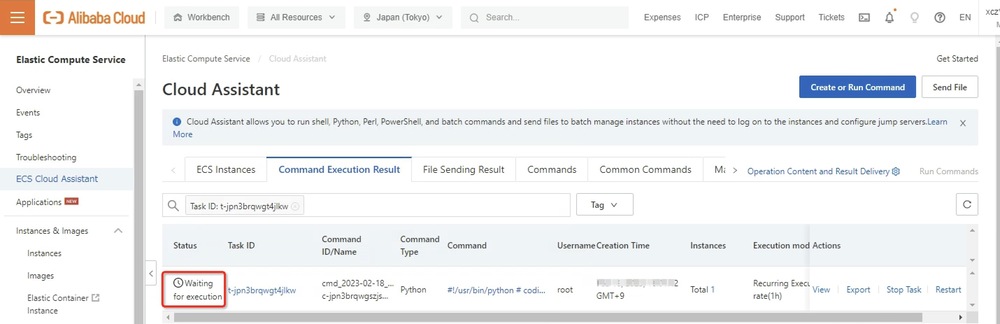
5. ECSコンソールから下記の自動タスクが作成され、実行待ちのステータスになっていることを確認できます。
3. さいごに
本章ではAlibabaCloud ECS の2つの定期自動再起動の設定方法を紹介させて頂きました。オペレーションオーケストレーションサービス (OOS)による設定方法は、AlibabaCloudコンソール上の操作だけで済むのでクラウド初心者の方にも簡単にご利用頂けます。CloudAssistantCommandsの設定方法はPythonスクリプトを実行する必要があるため、ある程度AlibabaCloud SDK、Python知識を持っている方に向いています。
興味を持っている方はぜひお試しいただければ幸いです。
関連サービス
\ 業務課題をデジタルで支援 /
デジタルツールの選定から導入の手引きまで、中小規模のお客さまへわかりやすくお伝えします。
メールマガジン登録(無料)
ビジネスに役立つ記事やウェビナー情報をお届けします。
おすすめの記事
条件に該当するページがございません